
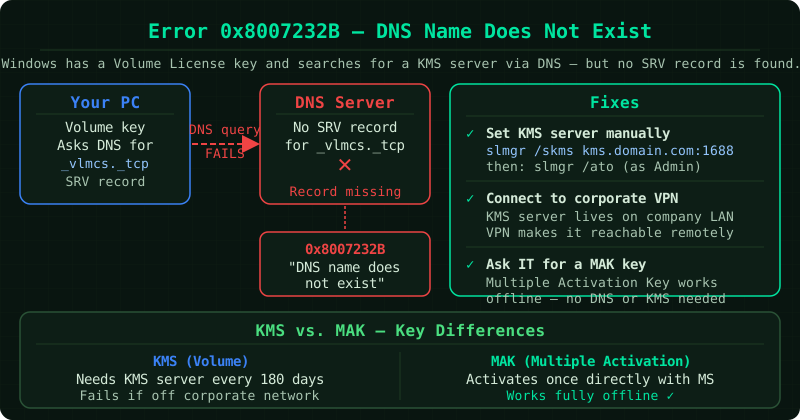
Error code 0x8007232B appears during Windows activation with the message: “DNS name does not exist.” This is a network-level error — Windows attempted to locate a Key Management Service (KMS) server by querying DNS, and the query failed.
According to Microsoft’s support documentation, this error almost exclusively affects devices configured for volume licence (KMS) activation. It is common on workplace computers and rarely appears on personal home devices using retail product keys.
What KMS activation is
Key Management Service (KMS) is Microsoft’s volume licensing system for organisations. Instead of each device activating individually against Microsoft’s servers, devices activate against a KMS server running on the organisation’s internal network. The KMS server’s address is published in DNS, and Windows finds it automatically by querying for a specific DNS record.
Error 0x8007232B means Windows sent that DNS query and received no valid response — the KMS server either is not advertised in DNS, is unreachable, or the device is on a network that cannot reach it.
Scenario 1 — Personal home device
If this error appears on a personal computer, the most likely cause is that the Windows installation was built using a volume licence image — common with PCs sold without Windows pre-installed, PCs that were re-imaged, or editions downloaded from unofficial sources.
Volume licence versions of Windows look for a KMS server to activate. On a home network with no KMS server, they cannot activate and produce this error.
Fix: Replace the volume licence key with a retail product key.
Open an administrator Command Prompt and run these commands in order:
slmgr /ipk XXXXX-XXXXX-XXXXX-XXXXX-XXXXXReplace XXXXX-XXXXX-XXXXX-XXXXX-XXXXX with your 25-character retail product key.
slmgr /atoThis triggers online activation using the new key.
If you do not have a retail product key, you can purchase one from the Microsoft Store. Windows 10 and 11 retail keys are available directly from Microsoft.
Scenario 2 — Work or domain-joined device
On a workplace computer, 0x8007232B means the device cannot reach the organisation’s KMS server. This can happen when:
- The device is working remotely and is not connected to the corporate VPN
- The KMS server’s DNS record has expired or was removed
- The KMS server itself is offline
- A firewall is blocking TCP port 1688 (the KMS port)
Fix — Connect to VPN first: If you are working remotely, connect to your corporate VPN and try activating again. Windows should find the KMS server automatically once the VPN is connected.
Fix — Verify DNS resolution (for IT administrators):
Open an administrator Command Prompt and run:
nslookup -type=srv _vlmcs._tcpIf this returns a valid host and port, the DNS record exists. If it returns an error or no records, the KMS SRV record needs to be added to DNS by an administrator.
Fix — Test KMS port connectivity:
telnet kms-server-hostname 1688If the connection is refused or times out, a firewall rule is blocking port 1688 between the device and the KMS server.
Verifying activation status
After applying any fix, verify that activation completed successfully:
slmgr /dliThis displays the current licence state. A successful activation shows “Licence Status: Licensed.”
To see the full licence details including the expiry date:
slmgr /dlvIf the error persists on a work device
If KMS activation cannot be established — for example, the KMS server is permanently decommissioned or the organisation is transitioning licensing — an IT administrator can switch the device to Multiple Activation Key (MAK) activation instead:
slmgr /ipk MAK-KEY-HERE
slmgr /ato
MAK activation does not require a KMS server and activates directly against Microsoft’s servers using a key with a set number of activations.
Common Questions
I am working from home and suddenly see this error. Why now?
KMS-activated devices renew their licence every 180 days. If your device has been off the corporate network for an extended period, the licence may have expired and the renewal attempt failed. Connecting to VPN and running slmgr /ato will renew it.
Does error 0x8007232B mean my Windows is not genuine? Not necessarily. It means activation cannot be completed at this moment due to a network or configuration issue. A volume-licensed Windows installation is genuine — it simply requires access to a KMS server to maintain activation status.
Can I convert a KMS-activated installation to retail?
Yes. An IT administrator or the device owner can install a retail product key using slmgr /ipk followed by slmgr /ato. This switches the activation method from KMS to online retail activation.
Step-by-step fix
Determine whether this is a personal or work device
Error 0x8007232B almost always affects devices configured for KMS (volume licence) activation — typically workplace or domain-joined computers. On a personal home device, this error means the installed Windows edition requires a volume licence key, which needs to be replaced with a retail key.
For personal devices: switch to retail activation
Open an administrator Command Prompt and run: slmgr /ipk YOUR-PRODUCT-KEY — replacing YOUR-PRODUCT-KEY with your 25-character retail key. Then run: slmgr /ato to trigger activation.
For work devices: contact your IT administrator
If the device is managed by an organisation, the KMS server address may be misconfigured or unreachable. Your IT administrator needs to verify KMS connectivity using: nslookup -type=srv _vlmcs._tcp — run from an administrator Command Prompt.
Check DNS resolution for the KMS server
On a domain-joined device, run: nslookup -type=srv _vlmcs._tcp from an administrator Command Prompt. If it returns no records or an error, the DNS record for the KMS server is missing or the device cannot reach the network where the KMS server is located.