
Error code 0xC004F050 appears when Windows cannot accept the product key you entered. The full message from the Software Licensing Service reads: “The product key is invalid.” This does not mean Windows itself is broken — it means the key was rejected before activation could complete.
According to Microsoft’s activation error documentation, this error has a small number of causes, each with a specific resolution.
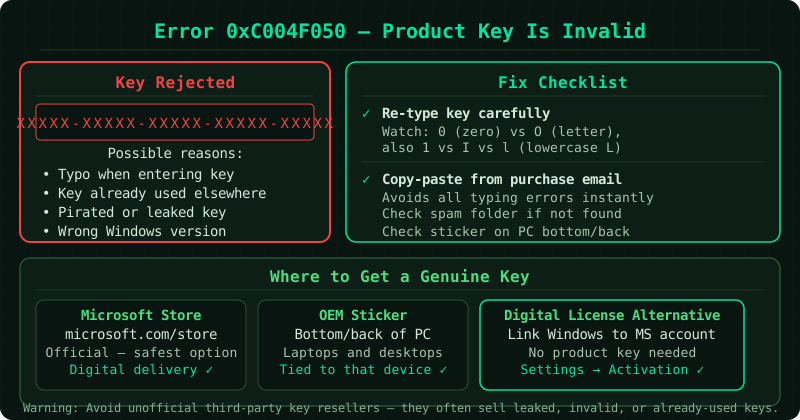
What causes error 0xC004F050
The product key was typed incorrectly. A 25-character Windows product key contains only letters and digits, but several characters are visually similar: the digit 0 and the letter O, the digit 1 and the letters I or L. A single wrong character produces this error.
The product key is for a different Windows edition. Windows Home, Pro, Education, and Enterprise each require a different product key. Using a Pro key on a Home installation, or a Home key on a Pro installation, results in 0xC004F050.
The product key is for a different version of Windows. A Windows 10 key cannot activate Windows 11, and a Windows 7 or 8 key cannot activate Windows 10 or 11 through the standard channel.
The product key has already been used on the maximum number of devices. Retail keys are typically licensed for one device. If the same key was previously used on another device, Windows may reject it.
The product key is not legitimate. Keys purchased from unofficial marketplaces are frequently invalid, revoked, or already used. Microsoft does not support keys obtained from sources other than authorised retailers.
Step 1 — Re-enter the product key carefully
Open Settings > System > Activation and select Change product key. Before typing, check your key source — the physical sticker on your device, the digital confirmation email, or the Microsoft account order history — and read each character precisely.
Common transcription mistakes:
0(zero) written asO(letter O)1(one) written asI(letter I) orL(letter L)8written asB5written asS
If copying from a digital source, paste the key directly rather than retyping it to eliminate input errors.
Step 2 — Verify your Windows edition
The product key must match the edition of Windows currently installed.
To check your edition: Settings > System > About — look for the Edition field.
Common mismatches:
- Buying a Windows Pro key but having Windows Home installed (or vice versa)
- Using a key from a different device that runs a different edition
If you need to upgrade from Home to Pro, purchase an upgrade key from the Microsoft Store directly — this is different from a standard Home or Pro activation key.
Step 3 — Run the activation troubleshooter
Go to Settings > System > Activation and select Troubleshoot. The troubleshooter checks for common activation problems and can resolve some automatically, including cases where Windows recognises your hardware configuration from a previous activation.
Step 4 — Use phone activation as a fallback
If the troubleshooter does not resolve the error and your key is legitimate, try phone activation:
- Open an administrator Command Prompt
- Run:
slui 4 - Select your country and call the displayed number
- Follow the automated system to receive an activation confirmation ID
- Enter the confirmation ID when prompted
Phone activation connects directly to Microsoft’s licensing system and can resolve cases where online activation is blocked.
Step 5 — Contact Microsoft support
If your product key came with a new device, was purchased from the Microsoft Store, or from an authorised retailer, and the steps above have not resolved the error, contact Microsoft support directly at support.microsoft.com. Have your proof of purchase ready. Microsoft can verify the key’s validity and, if legitimate, assist with activation.
If the key was purchased from a third-party marketplace
Keys purchased from unofficial sources — auction sites, discount key resellers, or peer-to-peer platforms — are not guaranteed to be valid. Microsoft does not provide support for keys obtained outside authorised channels. If a key from one of these sources triggers 0xC004F050, the key itself is the problem and Microsoft cannot resolve it.
Common Questions
I typed the key correctly and the edition matches but still get 0xC004F050. Why? The key may have been used on another device already, or it may have been revoked by Microsoft. Contact Microsoft support with proof of purchase to have the key’s status checked.
Can I activate Windows without a product key? Windows 10 and 11 can run without activation, but unactivated Windows displays a watermark on the desktop, disables personalisation settings, and receives a persistent notification. Full functionality requires a valid product key or a digital licence linked to your Microsoft account.
My key worked before but now shows 0xC004F050. What happened? A previously working key that now fails activation may have been revoked by Microsoft — this happens when the same key is detected on too many devices simultaneously. Contact Microsoft support to resolve a legitimate revocation.