
Error code 0xC004C008 appears with the message: “The activation server determined that the specified product key has been blocked.” This is a server-side rejection — Microsoft’s activation infrastructure has flagged this specific product key and is refusing to complete the activation.
The error is distinct from key entry mistakes or network problems. The key reached Microsoft’s servers successfully; the servers blocked it.
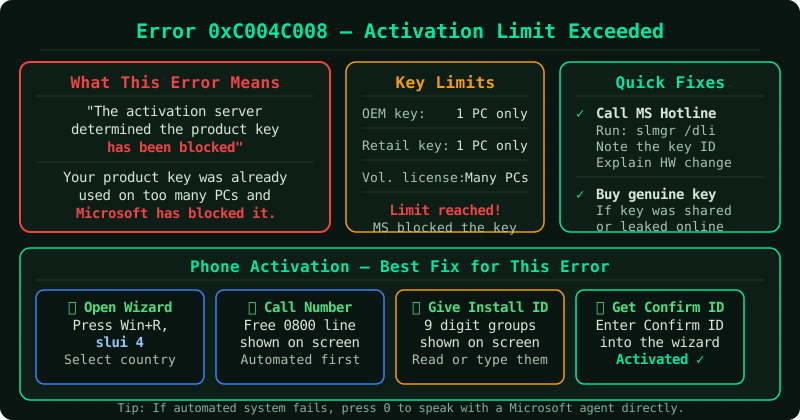
What causes 0xC004C008
The product key exceeded its activation limit. Retail Windows licences are typically licensed for one device at a time. If the same key is used to activate Windows on more devices than the licence permits — including transfers that were not properly deactivated on the previous device — Microsoft’s servers block further activations.
The key was reported as compromised or misused. Microsoft monitors product key usage patterns. Keys associated with volume fraud, abnormal activation counts across many devices, or sales from channels that violated Microsoft’s terms can be blocked across all activations.
The key originated from an unauthorised channel. Keys sold through grey-market resellers are frequently purchased in bulk through unauthorised channels and then resold individually. Microsoft blocks keys discovered to have come from these sources, regardless of how the individual buyer obtained them.
The device had significant hardware changes. When major hardware components — particularly the motherboard — are replaced, Windows may treat the device as a new machine and require a new activation. A retail key already associated with the previous hardware configuration may be rejected on the new configuration.
Step 1 — Run the activation troubleshooter
Go to Settings > System > Activation and select Troubleshoot. For keys blocked due to hardware changes on the same device, the troubleshooter can sometimes verify the ownership history and restore activation without requiring a new key.
Step 2 — Deactivate Windows on the previous device (if applicable)
If you are transferring a retail licence from one device to another, the previous device should have Windows deactivated first. While Windows does not have a built-in “deactivate” option, you can remove the key from the old device using an administrator Command Prompt:
slmgr /upkThis uninstalls the product key from the old device. After doing this, attempt activation on the new device again. Note that this step only helps if you still have access to the original device.
Step 3 — Try phone activation
Phone activation uses a separate verification system and can sometimes succeed where online activation fails for blocked keys, particularly in cases of hardware upgrades:
- Open an administrator Command Prompt and run:
slui 4 - Select your country and call the displayed number
- Follow the automated system — it will ask how many devices the key is currently active on
- If you are transferring from an old device to a new one, answer honestly
- The automated system or a support representative can issue a confirmation ID
Step 4 — Contact Microsoft support
If the key was legitimately purchased, contact Microsoft support at support.microsoft.com with:
- The exact error code (0xC004C008)
- Proof of purchase (receipt, order confirmation, or original device documentation)
- The purchase channel (Microsoft Store, retailer, OEM device, etc.)
Microsoft support can check the key’s block status and, for legitimately purchased keys, issue a replacement or remove the block.
Step 5 — Purchase a new key if the source was unofficial
If the key was purchased from a third-party marketplace or reseller not authorised by Microsoft, there is no guarantee of resolution. Microsoft does not support keys from unauthorised sources. The only reliable path forward is purchasing a legitimate retail or digital licence from the Microsoft Store or an authorised retailer.
Checking activation status
To see the current licence state:
slmgr /dliIf the output shows “Notification” or “Out-of-tolerance,” Windows is not activated. The full details including which server evaluated the key:
slmgr /dlvCommon Questions
I have only ever used this key on one device. Why is it blocked? This can happen if the key was purchased from a source that previously sold the same key to other buyers. Grey-market keys are frequently duplicated across many sales. Even if you have never used the key on multiple devices, Microsoft’s systems may have seen it activated elsewhere.
My computer was repaired and the motherboard was replaced. Is that why? Yes — a motherboard replacement causes Windows to detect a new hardware identity. A retail key linked to the original hardware may fail on the new hardware configuration. Contact Microsoft support with your repair documentation; this is a supported scenario for retail licence transfers.
Will my files be deleted if I cannot resolve this? No. An activation error does not affect stored files or installed software. Windows continues to function in an unactivated state, but displays a desktop watermark, persistent notifications, and disables personalisation settings until a valid activation is established.