
Software recovery tools — including Microsoft’s own Windows File Recovery — work by reading file system data that was marked as deleted but not yet overwritten. They require the drive to be physically functional: spinning, detected by the BIOS, and able to respond to read commands. When a drive cannot meet those conditions, running a software tool does not help and can actively cause more damage.
If your drive is making clicking or grinding sounds, is not detected by the computer at all, or has been exposed to water, heat, or physical impact, the next step is a professional data recovery service — not another scan.
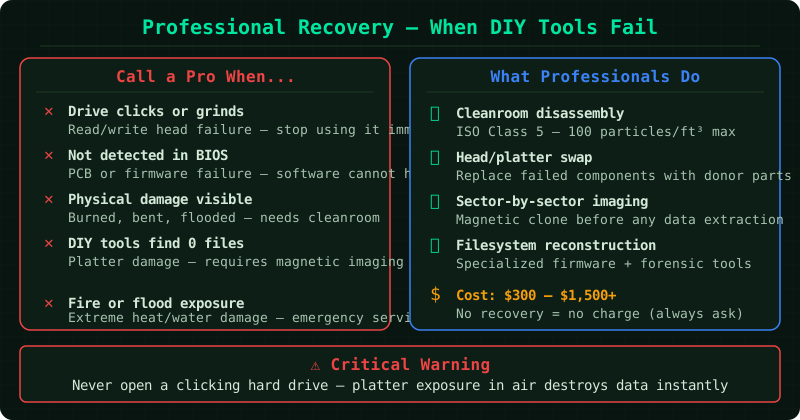
Signs you need professional recovery, not software
According to Seagate’s official support documentation, continuing to run a physically damaged drive risks the read heads making repeated contact with the platters, which can permanently destroy the magnetic surface where data is stored.
Stop using the drive and contact a professional service if you notice any of the following:
- Clicking, grinding, or beeping sounds during operation — this is the read head failing to locate the track, repeatedly resetting, or physically contacting the platter surface
- Drive not detected by BIOS or Windows — the drive does not appear in Disk Management, Device Manager, or the BIOS boot device list
- Burning smell or visible scorch marks on the circuit board — electronic component failure
- Water, liquid, or flood exposure — moisture inside the drive enclosure corrodes platters and electronics
- Drop or impact damage followed by access failure — internal components may have shifted or shattered
- Drive spins up but nothing is readable — possible read head failure or severe platter damage
Each time a physically damaged drive is powered on without professional intervention, the window for successful recovery narrows.
What professional data recovery involves
Professional recovery is fundamentally different from software recovery. It addresses the physical hardware, not just the file system.
Cleanroom environment: Hard drive platters are precision components — a single dust particle landing on the platter surface can cause a head crash during recovery. Reputable services operate in ISO Class 5 or ISO Class 100 cleanrooms, where airborne particles are filtered to a fraction of what exists in a normal room. Opening a drive outside a cleanroom is not a viable recovery option.
Component replacement: Failed read heads are swapped with matching components sourced from donor drives of the same model, revision, and firmware version. Damaged circuit boards are repaired or replaced. This work requires specialist equipment and an inventory of compatible parts.
Sector-by-sector imaging: Before any data extraction begins, the service creates a complete image of every readable sector on the original drive. All subsequent recovery work is performed on that image — not the original — preserving whatever remains on the damaged hardware.
Logical recovery: Once a stable image exists, file system reconstruction and data extraction proceed using the same techniques as software recovery, but with a full physical image as the source rather than a struggling live drive.
How to choose a legitimate service
The data recovery industry has no universal licensing requirement, which means quality varies significantly. According to Seagate’s partner programme documentation, the following criteria separate professional services from unreliable ones:
- Documented cleanroom facility. ISO Class 5 (Class 100) certification should be verifiable, not just claimed on a website. Ask for documentation if it is not displayed.
- No data, no fee policy. Reputable services do not charge a recovery fee if no data is recovered. Some charge a flat evaluation fee regardless of outcome — this should be disclosed upfront and kept separate from the recovery fee.
- Free evaluation before commitment. A reliable service will assess the drive, confirm what is recoverable, and provide a written quote before you authorise any work.
- Documented chain of custody. Your drive should be tracked from receipt through every stage of the process. Ask how they handle the drive physically.
- Data confidentiality policy. Confirm that recovered data is not retained after delivery, and that only authorised technicians access it during the process.
What to avoid:
- The freezer trick — placing a drive in a plastic bag and freezing it overnight. This is not supported by any manufacturer or recovery specialist and risks condensation damage that permanently destroys recoverable data.
- Running additional software scans on a drive that is clicking or grinding. Each power cycle risks further head crash damage.
- Opening the drive yourself. A home environment contains thousands of times more airborne particles than a cleanroom. Even a brief exposure contaminates the platter surface irreversibly.
What it costs
Professional data recovery is not cheap, and legitimate pricing reflects the cleanroom equipment, donor drive inventory, and specialist time required. Costs vary by the type and severity of damage:
| Damage type | Typical cost range |
|---|---|
| Logical damage not fixed by software | $300 – $700 |
| Mechanical failure (read head, motor) | $700 – $1,500 |
| Severe physical damage (water, fire, impact) | $1,000 – $3,000+ |
Services affiliated with drive manufacturers — such as Seagate Rescue and WD Data Recovery Services — publish their own pricing and tier structures. Independent services vary widely. Get a written quote before authorising any work.
Known limitations
- Overwritten data. Physical recovery cannot retrieve data that has been overwritten. No technique, including professional cleanroom work, can recover information from sectors that have been written over.
- SSD and flash storage. NAND flash memory operates differently from magnetic platters. Recovery from failed SSDs, USB drives, and memory cards is significantly more limited and often impossible for certain failure modes, even with professional equipment.
- No guarantee of full recovery. Even in ideal conditions with expert handling, some data may be unrecoverable. Damage to the platter surface destroys the magnetic encoding permanently. A professional service should give you an honest estimate of what is recoverable before you commit, not a blanket guarantee.
Common Questions
Do I pay if nothing is recovered? Under a no data, no fee policy — which reputable services offer — you do not pay a recovery fee if no data is retrieved. Confirm this policy in writing before sending the drive. Some services charge a separate, non-refundable evaluation fee; this should be disclosed and agreed to before any work begins.
How long does professional recovery take? Standard turnaround is typically 5 to 10 business days for mechanical failures. Complex cases — severe physical damage, multi-platter drives, fire or water exposure — can take 2 to 4 weeks. Most services offer an expedited option at higher cost for time-sensitive situations.
Is it safe to ship a hard drive to a recovery lab? Yes, provided you use appropriate packaging. Use the anti-static bag the drive came in or a purpose-made drive shipping box, then pad it inside a larger box to prevent movement. Use a tracked, insured courier. Record the drive’s serial number before shipping. Reputable services accept shipped drives routinely and provide pre-paid shipping labels in some cases.
My drive is not detected at all. Is recovery still possible? Often yes. A drive that is not detected by the BIOS may have failed circuit board components, a seized motor, or a firmware issue — all of which are addressable in a professional setting. Detection failure alone does not mean the platter data is gone.