
A file that appears missing is not always deleted. Before running any scanning tool, it is worth spending five minutes checking the locations where Windows keeps deleted or moved files — the Recycle Bin, File History backups, the OneDrive Recycle Bin, and shadow copies together cover the majority of cases where files seem to have disappeared.
Work through the steps below in order. Each check takes under two minutes and requires no additional software.
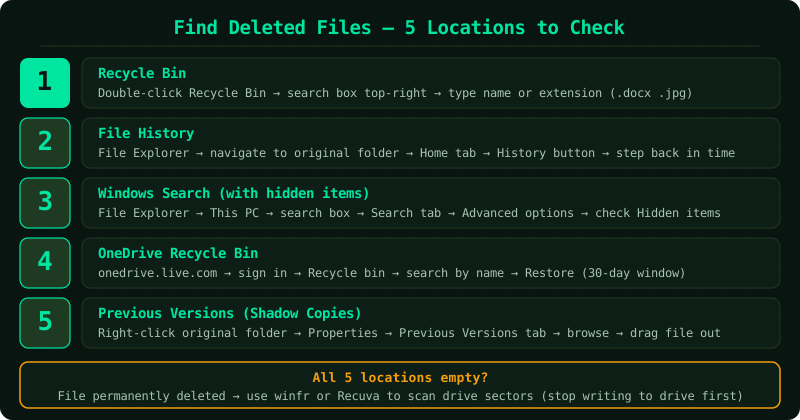
Why files seem to disappear
The most common reasons files are missing on Windows:
Deleted to Recycle Bin — the file is still there, just not in its original folder. The Recycle Bin can hold hundreds of files silently.
Moved by sync software — OneDrive, Dropbox, or Google Drive can move or rename files during sync conflicts without displaying any notification.
Quarantined by antivirus — Windows Defender and third-party antivirus programmes remove files they flag as threats. The file is held in quarantine and can be restored if the detection was a false positive.
Hidden by file attributes — some files are set to hidden by default or by applications. Windows Search does not show hidden files unless you enable the Hidden items option.
Deleted from a location that bypasses the Recycle Bin — USB drives, network shares, and files deleted from Command Prompt go directly to permanent deletion without the Recycle Bin step.
How to confirm a file is actually deleted
If searching the Recycle Bin, File History, OneDrive Recycle Bin, and Previous Versions all return no results, and the file cannot be found anywhere on the computer through Windows Search with Hidden items enabled, the file has been permanently deleted and is no longer accessible through Windows’ normal file system. At that point, a raw-sector scan with Windows File Recovery or Recuva is the next step — these tools look below the file system level for data that has not yet been overwritten.
Step-by-step fix
Search the Recycle Bin by name
Open the Recycle Bin by double-clicking its icon on the desktop. In the search box in the top-right corner of the Recycle Bin window, type the file name or part of it and press Enter. Windows filters the Recycle Bin contents to show only matching items. If you do not know the exact name, type the file extension instead — for example, type .docx to see all Word documents currently in the Recycle Bin, or .jpg to see all images. You can also sort the Recycle Bin by Date Deleted (click the column header) to see the most recently deleted items at the top. If the Recycle Bin icon is missing from your desktop: right-click the desktop → Personalize → Themes → Desktop icon settings → check Recycle Bin → Apply.
Check File History in the folder where the file was stored
File History backs up files in your Documents, Pictures, Desktop, Music, and Videos folders automatically if it was turned on before the file was deleted. To check: open File Explorer and navigate to the folder where the missing file was stored — for example, Documents or Desktop. Click the Home tab in the ribbon at the top, then click the History button (a clock icon with an arrow). A File History window opens showing backup versions of that folder. Use the left and right arrow buttons at the bottom to step backward through time — you can see the folder's contents as they were at each backup point. If you find the file in a previous backup, click it and press the green Restore button to recover it. If the Home tab shows no History button or clicking it opens a window with no results, File History was not enabled on this computer.
Search for the file in Windows Search including hidden locations
Sometimes a file is not deleted — it moved to a different location or is hidden. Open File Explorer. In the address bar, click on This PC to search the entire computer. Type the filename in the search box in the top-right corner. While the search is running, click the Search tab that appears in the ribbon and then click Advanced options → Hidden items to include hidden files in the results. Also enable File contents to search inside documents for specific text. If you remember approximate content of the file but not the name, type a phrase from inside the document in the search box — Windows Search indexes document contents and can locate files by their text. If the search returns no results, the file is not present on the computer in any location Windows can see — proceed to check cloud storage.
Check OneDrive Recycle Bin if the file was in a synced folder
OneDrive maintains its own Recycle Bin separate from Windows, and files deleted from OneDrive-synced folders go there rather than the Windows Recycle Bin. Open a browser and navigate to onedrive.live.com. Sign in with your Microsoft account. Click Recycle bin in the left panel. Files deleted within the last 30 days (93 days for Microsoft 365 subscribers) appear here, sorted by deletion date. Use the search box at the top of the OneDrive Recycle Bin to search by file name. Click the file to select it and then click Restore to return it to its original OneDrive folder — it syncs back to your computer within a minute or two. If you have OneDrive for Business (a work account), log into the appropriate account at portal.office.com and check the Recycle Bin there as well.
Check Previous Versions (Shadow Copies) for system-protected files
Windows automatically creates shadow copies of files through System Protection on most configurations. These are separate from File History and cover the entire drive rather than specific libraries. To check: open File Explorer, navigate to the folder where the file was, right-click the folder itself, and select Properties. Click the Previous Versions tab. If any shadow copies exist, they appear as a list with dates. Double-click an entry to browse its contents as they were at that date — the folder opens in a read-only window showing files from that point in time. If you find the deleted file, drag it out of the shadow copy window to your desktop or another folder to restore it. Note: System Protection must have been enabled and a restore point must have been created before the deletion for shadow copies to exist.