
Windows keeps deleted files recoverable longer than most users realise. A file deleted to the Recycle Bin takes two clicks to restore. A file permanently deleted — Shift+Delete, or Recycle Bin emptied — can still be recovered in many cases because Windows does not immediately erase file data from disk; it only marks the space as available and removes the directory entry. The actual data remains until new data overwrites it.
The right recovery method depends on how the file was deleted and what backup systems were active at the time.
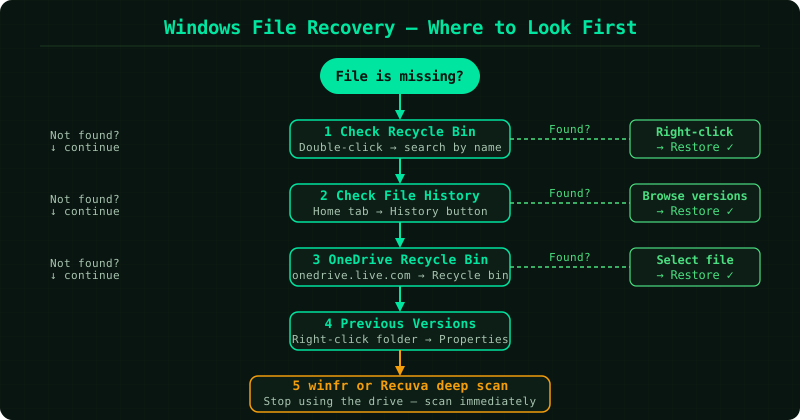
Which method matches your situation
Files are still in the Recycle Bin → How to Recover Deleted Files on Windows — restore in two clicks, no tools needed.
Recycle Bin was emptied, or Shift+Delete was used → Windows File Recovery Tool — Microsoft’s free winfr command-line tool scans raw drive sectors for file data that has not been overwritten.
File History or Windows Backup was enabled → File History on Windows — restore the exact version that existed before the deletion without any deep scanning.
You are not certain the file was deleted → How to Find Deleted Files on Windows — search the Recycle Bin, File History versions, OneDrive Recycle Bin, and shadow copies before concluding the file is gone.
The Recycle Bin icon is missing from the desktop → Recycle Bin Recovery on Windows — restore the icon and confirm whether files are still accessible inside.
Why permanently deleted files can still be recovered
When Windows deletes a file it does not erase the data. It removes the file’s entry from the Master File Table (on NTFS drives) and marks the disk sectors as available for reuse. The raw data remains in those sectors until a new file is written there. Recovery tools bypass the file system entirely and scan sectors directly for recognisable file signatures — the internal patterns that identify a JPEG, DOCX, or PDF. This is why recovery is possible even after formatting, as long as the drive has not been filled with new data since.
Solid-state drives behave differently. Many SSDs issue a TRIM command shortly after deletion, which signals the drive controller to zero out available sectors immediately. This can eliminate recovery chances faster than on a mechanical hard drive.
How to protect files going forward
Enable File History before you need recovery. Connect an external drive, go to Settings → System → Storage → Advanced storage settings → Backup options, and turn File History on. It backs up files in your Documents, Pictures, Desktop, and other libraries every hour by default, retaining versions for one month. No further configuration is required. When a file is lost, restoring from File History is faster and more reliable than any scanning tool because the backup copy is intact and complete.