
SSD failure is quieter than hard drive failure — no clicking, no grinding, often no warning at all. One moment the drive works; the next it does not appear in Windows or the BIOS. The absence of moving parts that makes SSDs fast and durable also makes their failure mode harder to diagnose and their data harder to recover.
The core issue is NAND flash technology. Unlike magnetic platters, where deleted data leaves a physical trace until overwritten, SSDs actively erase deleted data through a feature called TRIM. Understanding which type of failure has occurred determines what recovery is realistically possible — and what is not.
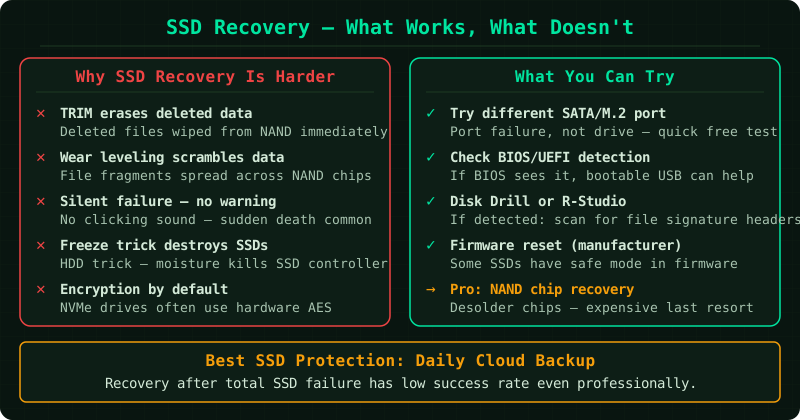
Why SSD recovery is fundamentally different from hard drive recovery
On a traditional hard drive, deleted or lost data remains magnetically encoded on the platters until new data physically overwrites it. Software tools exploit this by scanning for those residual patterns.
SSDs work differently in three important ways:
TRIM: When a file is deleted on an SSD, the operating system sends a TRIM command instructing the drive to erase those storage blocks immediately. This preserves write performance but means the data is gone before anything can scan for it. On any modern Windows or macOS system, TRIM is enabled by default.
Wear levelling: SSDs distribute write operations evenly across all storage cells to prevent any single area from wearing out faster. As a side effect, the physical location of a file on the NAND chips changes over time, making file system reconstruction more complex than on a hard drive.
NAND cell structure: Data is stored as electrical charge in NAND cells. When a cell is damaged by voltage spikes, heat, or wear, the charge — and the data it represents — is lost. There is no magnetic analogue to reconstruct.
Types of SSD failure and what can be done
Logical failure — firmware or file system error
The drive is detected by the BIOS and appears in Windows, but files are inaccessible, the drive shows as unformatted, or the system cannot boot from it.
This is the most recoverable scenario. The NAND itself is likely intact; the problem is the file system or firmware layer above it.
What to try:
Run Windows Check Disk to repair file system errors. Open Command Prompt as administrator and run:
chkdsk X: /f /rReplace X with the drive letter assigned to the SSD. The /f flag fixes errors, and /r locates bad sectors and attempts to recover readable data.
If chkdsk completes successfully and the drive becomes accessible, back up all data immediately before using the drive further.
If the drive is not assigned a letter, open Disk Management (right-click Start → Disk Management) to see if it appears as a raw or unallocated volume. Assigning a letter may allow chkdsk to run.
Limitation: If TRIM has already cleared the deleted sectors, recently deleted files will not be recoverable even on a logically failed drive that is otherwise intact.
Controller failure — drive not detected at all
The SSD controller chip manages the interface between the NAND chips and the rest of the system. When the controller fails, the drive does not appear in the BIOS, Device Manager, or Disk Management — it is as if the drive does not exist.
Software tools cannot help here, because they require the operating system to see the drive first.
Professional services can sometimes address controller failure through two approaches:
- Controller replacement: Sourcing a matching controller chip and reseating or reflowing it onto the circuit board. This requires specialist soldering equipment and a compatible donor board.
- Chip-off recovery: Physically removing the NAND chips from the board and reading them directly with specialist hardware that bypasses the controller entirely. The raw NAND data must then be reassembled — a complex process that varies by SSD architecture.
Success rates for controller recovery vary significantly by SSD model and the extent of the damage. According to Seagate’s data recovery documentation, this type of work is classified as a complex recovery and priced accordingly.
Physical NAND damage — fire, water, or voltage
Exposure to liquid, extreme heat, or electrical surge can damage the NAND chips themselves. When cells are physically destroyed, the electrical charge that encoded the data is gone.
Professional services can attempt chip-off recovery on physically damaged drives, but results depend on how many cells remain intact. Widespread cell damage means widespread data loss — no technique can reconstruct data from cells that no longer hold a charge.
What not to do with a failing SSD
The following approaches do not work for SSDs and may cause additional damage:
- The freezer trick. This approach has no basis in SSD failure mechanics. SSDs have no moving parts that benefit from thermal contraction, and condensation from a frozen drive will damage the electronics.
- Repeatedly powering the drive on and off. Each power cycle stresses the controller and NAND. If the drive is failing, minimise the number of times it is powered on until professional evaluation is complete.
- Continuing to write files to a degrading drive. If the SSD is showing errors, running slowly, or behaving unpredictably, stop writing to it. Every write triggers TRIM on deleted blocks and reduces the data available for recovery.
- Running deep-scan software tools on an undetected drive. If the BIOS cannot see the drive, no software running inside the operating system can see it either. Software tools require at minimum a detectable storage device.
When professional SSD recovery is worth considering
Professional recovery is worth pursuing when:
- The drive is not detected at all and the data has significant value
- The drive is detected but inaccessible and chkdsk cannot repair the file system
- The failure followed a specific event — power surge, liquid exposure, physical impact — that points to a defined hardware fault
It is worth setting realistic expectations before committing to a professional service. According to Seagate and WD’s data recovery documentation, TRIM-cleared data and cells with physical charge loss cannot be recovered by any method. Professional recovery addresses controller and firmware failures effectively; it cannot restore data that the drive itself has already erased.
Known limitations
- TRIM-cleared data is permanently gone. This is a fundamental characteristic of SSD technology, not a gap in current recovery techniques. No professional service can retrieve data that TRIM has erased.
- Soldered M.2 drives. On devices where the SSD is soldered directly to the motherboard — common in ultrabooks and some laptops — chip-off recovery is significantly more complex and expensive, and not all services support it.
- Warranty replacement does not include data recovery. If the SSD fails within its warranty period, the manufacturer will replace the hardware. The data is not retrieved as part of that process. Warranty and data recovery are entirely separate.
Common Questions
My SSD died suddenly with no warning. Is the data recoverable? Sudden death without prior symptoms often points to controller failure rather than gradual NAND wear. Controller failure is one of the more recoverable SSD failure types — professional services can sometimes bypass the failed controller and read the NAND directly. Success is not guaranteed, but it is not uncommon either. Have the drive evaluated before assuming the data is lost.
Does turning TRIM off help with recovery? If TRIM is disabled before files are deleted, those files remain on the NAND and can be scanned with software tools. However, TRIM is enabled by default on all modern operating systems for good reason — disabling it permanently to aid hypothetical future recovery is not a practical approach. On a drive that has failed, TRIM status at the time of failure determines what was preserved.
The SSD is under warranty — does that cover getting my data back? No. Manufacturer warranties cover hardware replacement, not data recovery. The replacement drive will be empty. If the data matters, pursue recovery through a professional service before or alongside the warranty claim — returning the drive for a warranty swap will end any recovery possibility.
How much does professional SSD recovery cost? Controller failure recovery typically falls in the $500 to $1,500 range, depending on the SSD model and failure type. Chip-off recovery on physically damaged drives can exceed $2,000. Evaluate the cost against the value of the data — for irreplaceable personal data or business-critical files, the investment is often justified.