
Norton 360 not opening on Windows 11 means clicking the Norton icon produces no response, Norton appears briefly then disappears, or Norton launches to an error screen without showing the main interface. According to Norton’s official support documentation, this class of failure is caused by corrupted service registrations, missing installation components, or conflicts with Windows security infrastructure — not by subscription or licensing issues.
What causes Norton 360 not opening on Windows 11
Corrupted Norton service — Norton 360 depends on a chain of Windows services that must all start in sequence: if any single service fails — the Norton Security service, the Norton Data Store service, or the Norton UI Agent — the interface cannot load. Windows Update occasionally breaks this service chain by modifying the security service infrastructure Norton relies on.
Failed previous update — Norton updates its components frequently in the background. If an update is interrupted — by a power loss, forced restart, or network drop — the installation can be left in an inconsistent state where some components are at the new version and others remain at the old version. This mismatch causes the interface to fail to initialise.
Windows Security Center conflict — Norton registers its protection status with the Windows Security Center. If this registration becomes corrupted, Windows can enter a state where it believes two conflicting security products are active, causing both to malfunction.
Startup order conflict — Norton’s user interface loads early during Windows startup. Other security applications, VPN clients, or system tools that also load at startup can intercept system calls before Norton initialises, causing Norton to launch into an error state.
How to fix Norton 360 not opening on Windows 11
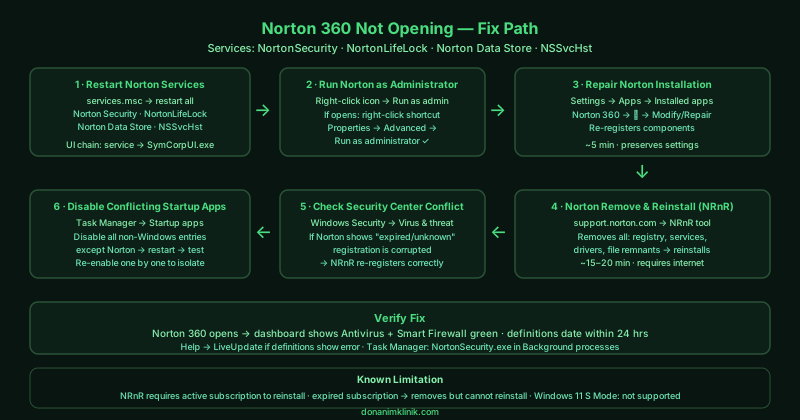
Work through the steps in order. The Norton Remove and Reinstall tool (step 4) resolves the vast majority of cases — steps 1–3 are faster attempts worth trying first.
How to verify the fix
After each fix attempt, open Norton 360 from the Start menu. The main Norton interface should load and display your protection status — the dashboard should show green indicators for Antivirus, Smart Firewall, and other enabled features. Check that the subscription status shows active and the virus definitions date is within the last 24 hours. If Norton opens but shows definition errors, allow it to run LiveUpdate (Help > LiveUpdate) to download the latest definitions.
Known limitations
Norton’s Remove and Reinstall tool requires a valid Norton subscription to complete reinstallation — it downloads the current Norton version using your account credentials. If your subscription has expired, the tool removes Norton but cannot reinstall it. Additionally, the NRnR tool requires administrator access and an active internet connection of at least 10 Mbps for the download phase. On corporate or managed devices where application installation is controlled by IT policy, the NRnR tool may fail to run — contact the IT department to reinstall Norton through the managed software deployment system. Norton also does not support Windows 11 S Mode — if your device runs Windows 11 S Mode, Norton cannot be installed or repaired; only Microsoft Store security apps are permitted in S Mode.
Step-by-step fix
Restart Norton services from the Windows Service Manager
Press Windows + R, type services.msc, and press Enter. Look for services starting with 'Norton' — common ones include Norton Security, NortonLifeLock, and Norton Data Store. Right-click each Norton service and select Restart. Also check that each service's Status shows Running and Startup type shows Automatic. Norton 360 uses multiple interdependent services: if the Norton Security service fails to start, the user interface cannot load regardless of the application's own integrity. After restarting all Norton services, try opening Norton 360 from the Start menu.
Run Norton 360 as administrator
Right-click the Norton 360 icon in the taskbar, system tray, or Start menu and select Run as administrator. On Windows 11, Norton requires administrator-level access to load its security components. Some Windows updates change user account permission levels in ways that prevent applications from inheriting the elevated permissions they previously had. If Norton opens when run as administrator, right-click the Norton shortcut, select Properties > Advanced, and check Run as administrator to make this permanent.
Repair Norton using its built-in repair option
Open Settings > Apps > Installed apps. Search for Norton 360 and click the three-dot menu next to it, then select Modify or Repair. If a repair option is available, follow the on-screen prompts — Norton's installer can re-register its components and replace corrupted files without requiring a full reinstall. This takes approximately 5 minutes. If no Modify/Repair option appears (this option is absent in some Norton versions), proceed to the Remove and Reinstall tool in the next step.
Download and run the Norton Remove and Reinstall tool
Go to Norton's official support site and download the Norton Remove and Reinstall (NRnR) tool. This tool is separate from the standard uninstaller — it performs a deeper removal that clears all Norton registry entries, services, drivers, and file remnants that the standard uninstaller leaves behind. Run NRnR, select Remove & Reinstall, and follow the prompts. The tool removes Norton completely and automatically downloads and installs the current version using your existing subscription. This process takes 15–20 minutes and requires an internet connection. Find the tool at: support.norton.com (search for 'Norton Remove and Reinstall').
Check for conflicts with Windows Security Center
Norton registers itself with the Windows Security Center to indicate it is managing antivirus protection. If this registration becomes corrupted — which can happen after Windows Update — Norton may fail to launch while Windows Security Center shows conflicting status information. Open Windows Security (search for it in Start) and go to Virus & threat protection. If Norton is listed as the active protection provider but appears as 'expired' or 'unknown status,' Norton's Security Center registration is corrupted. Run the NRnR tool to re-register Norton correctly.
Disable conflicting startup programs temporarily
Some third-party applications — particularly other security software, system optimisers, and VPN clients — load at startup and conflict with Norton's initialisation. Open Task Manager (Ctrl + Shift + Esc), go to the Startup apps tab, and temporarily disable all non-Windows startup entries except Norton. Restart your computer and try opening Norton before re-enabling other startup programs one by one. If Norton opens after disabling a specific program, that program is conflicting with Norton's startup sequence — check both vendors' support sites for known compatibility issues.