
Antivirus errors on Windows 11 range from programs that will not open to software that slows the computer, blocks internet access, or fails to update its virus definitions. The most common antivirus problems — across Norton, McAfee, Malwarebytes, and Windows Security — share a set of root causes: service conflicts with Windows updates, corrupted installation files, and permission issues introduced by Windows security hardening.
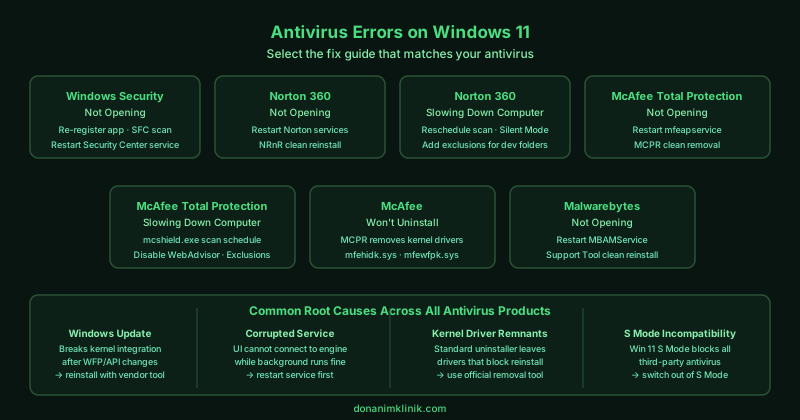
This hub covers the most common antivirus errors on Windows 11 and Windows 10. Select the guide that matches your situation.
Fix guides in this pillar
Windows Security Not Opening on Windows 11 — Fix
Windows Security (Windows Defender) will not open from the Start menu or taskbar, shows a blank window, or reports errors when accessing Virus & threat protection. This guide covers re-registering Windows Security, repairing Windows system files, and resolving conflicts with third-party software that can prevent the built-in security app from launching.
Best for: Windows Security blank screen or crash on open, “Windows Security Center service is not running” error, Virus & threat protection page not loading, Windows Defender greyed out.
Norton Not Opening on Windows 11 — Fix
Norton 360 or Norton AntiVirus does not open after clicking the icon, shows an error on launch, or the Norton interface appears briefly then closes. This guide covers repairing the Norton installation, restarting Norton services, and reinstalling using Norton’s official removal tool.
Best for: Norton 360 icon does nothing when clicked, Norton opens then immediately closes, “Norton has encountered a problem and needs to close” error, Norton not loading after Windows Update.
Does Norton Slow Down Your Computer — Fix
Norton antivirus causes high CPU usage, slow startup, sluggish file operations, or unresponsive programs on Windows 11. This guide covers adjusting Norton’s scan schedule, enabling Silent Mode during gaming and video calls, configuring exclusions for trusted folders, and assessing whether a lighter alternative resolves the performance issue.
Best for: Computer slow after installing Norton, Norton using high CPU or disk in Task Manager, Norton scheduled scan freezing the computer, programs slow to open with Norton installed.
McAfee Not Opening on Windows 11 — Fix
McAfee Total Protection or McAfee LiveSafe does not open, shows an error when launching, or the McAfee interface is missing from the taskbar. This guide covers repairing the McAfee installation, restarting McAfee services, and reinstalling using McAfee’s Consumer Product Removal tool.
Best for: McAfee icon not responding, McAfee Total Protection not loading, McAfee error on startup, McAfee disappeared after Windows Update.
Does McAfee Slow Down Your Computer — Fix
McAfee causes high CPU usage, slow boot times, or sluggish performance during everyday tasks on Windows 11. This guide covers scheduling scans outside working hours, configuring Real Scan exclusions for trusted folders, and adjusting McAfee’s performance settings.
Best for: Computer slow after installing McAfee, McAfee using high CPU in Task Manager, slow startup with McAfee installed, McAfee scan freezing the computer.
McAfee Won’t Uninstall on Windows 11 — Fix
McAfee cannot be uninstalled through Windows Settings or Control Panel — the uninstaller shows an error, freezes mid-process, or McAfee reinstalls itself after removal. This guide covers using McAfee’s official Consumer Product Removal (MCPR) tool, which bypasses the standard uninstaller and removes all McAfee components.
Best for: McAfee uninstall fails with error, McAfee stuck in Programs and Features, McAfee reinstalls after removal, McAfee removal taking hours without completing.
Malwarebytes Not Opening on Windows 11 — Fix
Malwarebytes will not open after clicking the icon, crashes on launch, or disappeared from the system after a Windows update. This guide covers restarting Malwarebytes services, repairing the installation, and reinstalling using the official Malwarebytes Support Tool.
Best for: Malwarebytes icon does nothing, Malwarebytes crashes immediately on open, Malwarebytes missing from Programs after update, “Malwarebytes Service is not running” error.