
Windows Security not opening on Windows 11 means the Windows Security app shows a blank screen, crashes immediately on launch, or clicking the icon in the taskbar or Start menu produces no response. According to Microsoft’s official Windows Security documentation, this is almost always a problem with the Windows Security app’s user interface registration rather than the underlying Windows Defender protection engine — the computer typically remains protected even when the app cannot open.
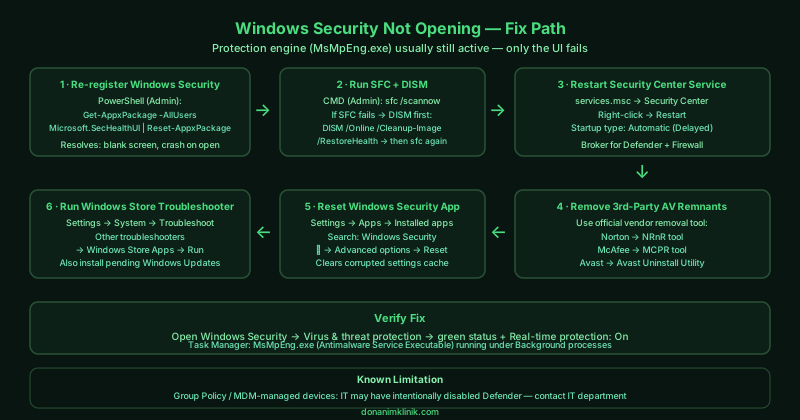
What causes Windows Security not opening on Windows 11
Corrupted app registration — The Windows Security application is a Modern/UWP app that requires a valid app registration to launch. After a Windows Update or a failed third-party antivirus uninstall, this registration can become corrupted, causing the app to fail to load its interface while the Defender engine continues running in the background.
Third-party antivirus remnants — When a third-party antivirus is uninstalled without using the vendor’s official removal tool, it leaves registry entries and service registrations that tell Windows another security product is in control. Windows Security remains disabled waiting for the non-existent product to release control.
Corrupted system files — Windows system file corruption — caused by incomplete updates, disk errors, or interrupted restarts — can affect the Windows Security components, preventing the app from initialising correctly.
Security Center service not running — The Security Center service acts as a broker between Windows Security, the firewall, and installed antivirus products. If this service stops or enters an error state, the Windows Security app cannot open.
How to fix Windows Security not opening on Windows 11
Work through the steps in order. Step 1 (re-register the app) resolves the majority of cases.
How to verify the fix
After each step, open Windows Security from the Start menu or by clicking the shield icon in the taskbar. The app should open and display the Home page with green status indicators. Navigate to Virus & threat protection and confirm Real-time protection is On and the last quick scan date is recent.
Known limitations
Microsoft’s troubleshooter and app reset cannot fix Windows Security on computers where an IT administrator has disabled Windows Defender via Group Policy or mobile device management (MDM). On work or school devices enrolled in an organisation’s management system, Windows Security may be intentionally restricted or replaced by enterprise antivirus software. In these cases, contacting the IT department is the only path to resolving security software issues. Additionally, some malware specifically targets Windows Defender and disables it through registry modifications — if all software fixes fail and the device shows signs of infection (unexpected processes, browser redirects, changed settings), using Windows Defender Offline Scan from a USB drive may be necessary before any software fixes can take effect.
Step-by-step fix
Re-register the Windows Security app
Open PowerShell as administrator — right-click the Start button and select Windows PowerShell (Admin) or Terminal (Admin). Run this command: Get-AppxPackage -AllUsers Microsoft.SecHealthUI | Reset-AppxPackage. Press Enter and wait for the command to complete. This resets the Windows Security app registration, which resolves blank screen and launch failures caused by a corrupted app state without affecting the underlying Windows Defender protection engine. After the command completes, restart your computer and try opening Windows Security.
Run System File Checker to repair corrupted files
Open Command Prompt as administrator (search for cmd, right-click, select Run as administrator). Type sfc /scannow and press Enter. System File Checker scans all protected Windows system files — including Windows Security components — and replaces any that are corrupted or missing. The scan takes 10–15 minutes. After it completes, restart your computer. If SFC reports it could not repair all files, run DISM first: type DISM /Online /Cleanup-Image /RestoreHealth and press Enter (takes 10–20 minutes), then run sfc /scannow again.
Restart the Windows Security Center service
Press Windows + R, type services.msc, and press Enter. Scroll down to Security Center. Right-click it and select Restart. Also check that the service's Startup type is set to Automatic (Delayed Start) — right-click, select Properties, and verify. The Security Center service coordinates Windows Security, Windows Firewall, and third-party antivirus reporting. If this service is stopped or in an error state, Windows Security cannot open. After restarting the service, open Windows Security from the Start menu.
Remove conflicting third-party antivirus remnants
If a third-party antivirus (Norton, McAfee, Avast, or similar) was recently uninstalled, its remnants can prevent Windows Security from activating. Use the antivirus vendor's official removal tool to ensure all components are removed: Norton uses the Norton Remove and Reinstall tool, McAfee uses MCPR (McAfee Consumer Product Removal), Avast uses the Avast Uninstall Utility. After running the official removal tool, restart your computer — Windows Security should re-enable automatically. Search the vendor's support site for '[brand] removal tool' to find the official download.
Reset Windows Security through Windows Settings
Open Settings > Apps > Installed apps. Search for Windows Security and click the three-dot menu next to it. Select Advanced options, then scroll down and click Reset. Confirm the reset. This clears the app's local data and configuration, which resolves launch failures caused by corrupted settings or cached data. After resetting, restart your computer and open Windows Security — it will re-initialise with default settings and re-connect to the Windows Defender engine.
Run the Windows Security troubleshooter
Open Settings > System > Troubleshoot > Other troubleshooters. Find Windows Store Apps and click Run. Although this troubleshooter covers all Store apps, it can detect and fix Windows Security app registration issues that prevent it from launching. If the troubleshooter finds and fixes a problem, restart your computer and test. Also check Windows Update and install any pending updates — Microsoft regularly releases patches for Windows Security app issues through Windows Update.