
QuickBooks Desktop won’t open means clicking the QuickBooks icon produces no result, or QuickBooks briefly appears then closes before fully loading. According to Intuit’s official troubleshooting documentation, the most common causes are a stuck background process left over from a previous crash, a corrupted configuration file, or a broken Windows component (.NET Framework or Visual C++) that QuickBooks depends on.
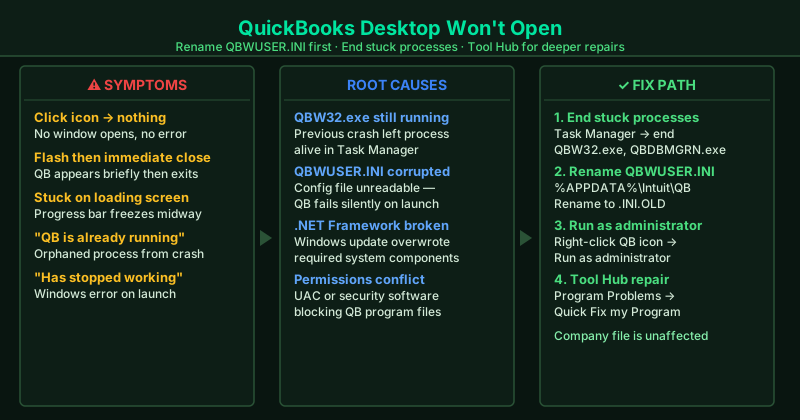
What causes QuickBooks Desktop not to open
Stuck QBW32.exe or QBDBMGRN.exe process — A previous QuickBooks session crashed or was forced closed. The orphaned process remains in Task Manager and blocks a new launch. QuickBooks detects the running process and refuses to start a second instance.
Corrupted QBWUSER.INI file — This file stores QuickBooks configuration and the list of recently opened company files. If it becomes corrupted — from a crash, a Windows update, or a failed QuickBooks update — QuickBooks cannot read its own settings and silently fails to launch.
Damaged .ND or .TLG support files — These files live in the same folder as your company file and store network and transaction log information. Corruption in either file can prevent QuickBooks from initialising, even when running in single-user mode.
Broken .NET Framework or MSXML components — QuickBooks Desktop is built on Microsoft .NET Framework and MSXML. If a Windows update overwrites or corrupts these components, QuickBooks cannot start. This is particularly common after major Windows 11 feature updates.
Insufficient permissions — QuickBooks needs full read/write access to its program files and to the folder containing the company file. If User Account Control or a third-party security tool has restricted these permissions, QuickBooks fails silently on startup.
How to fix QuickBooks Desktop not opening
Work through the steps in order. Most users resolve this at step 1, 3, or 5.
How to verify the fix
After each step, double-click the QuickBooks Desktop icon and wait 20 seconds. If QuickBooks opens to the No Company Open screen or directly to your company file, the fix worked. If QuickBooks opens but cannot load the company file, see QuickBooks Company File Won’t Open — Fix for the next steps.
Step-by-step fix
End all QuickBooks background processes in Task Manager
Press Ctrl + Shift + Esc to open Task Manager and click the Processes tab. Look for any of these processes: QBW32.exe, QBDBMGRN.exe, QBCFMonitorService.exe, qbupdate.exe. Right-click each one and select End Task. A previous QuickBooks crash often leaves these processes running in the background, which prevents a new launch. After ending all QuickBooks processes, wait 30 seconds and try opening QuickBooks again.
Delete the .ND and .TLG files from your company file folder
Open File Explorer and navigate to the folder that contains your QuickBooks company file (.qbw). In that same folder, look for files with the same name as your company file but with the extensions .ND and .TLG. Right-click each one and delete it. These support files become corrupted after crashes or Windows updates. QuickBooks automatically recreates them when you open your company file — your data is not affected.
Rename the QBWUSER.INI configuration file
Press Windows + R, type %APPDATA%\Intuit\QuickBooks, and press Enter. Find the file named QBWUSER.INI. Right-click it and rename it to QBWUSER.INI.OLD. Also rename the file named EntitlementDataStore.ecml to EntitlementDataStore.ecml.OLD if it exists. These files store QuickBooks settings and can become corrupted. Renaming them forces QuickBooks to create fresh configuration files on the next launch.
Run QuickBooks as administrator
Right-click the QuickBooks Desktop icon on your desktop or in the Start menu and select Run as administrator. If QuickBooks opens this way, a Windows permissions conflict is blocking normal startup. To make this permanent: right-click the QuickBooks shortcut, select Properties, go to the Compatibility tab, check Run this program as an administrator, and click OK.
Use QuickBooks Tool Hub — Program Problems tool
Download QuickBooks Tool Hub from Intuit's official support page (search 'QuickBooks Tool Hub download Intuit'). Install and open it. Click the Program Problems tab and select Quick Fix my Program. This tool ends QuickBooks background services, clears temporary files, and repairs common installation issues automatically. After it finishes, try opening QuickBooks again. If that does not work, return to Tool Hub and run the QuickBooks Install Diagnostic Tool from the same tab.
Run QuickBooks in Windows compatibility mode
Right-click the QuickBooks Desktop shortcut and select Properties. Go to the Compatibility tab. Check Run this program in compatibility mode for and select Windows 8 from the dropdown. Click Apply and OK. Try opening QuickBooks. Some QuickBooks Desktop versions — particularly 2018 and 2019 — have launch issues on Windows 11 that compatibility mode resolves.
Perform a clean reinstall using the QuickBooks Clean Install Tool
Download the QuickBooks Clean Install Tool from Intuit's support page. Before running it, note your QuickBooks license number (found on the original packaging or your Intuit account). Run the Clean Install Tool — it uninstalls QuickBooks and removes leftover files that a standard uninstall misses. Then reinstall QuickBooks from your original disc or from your Intuit account download. Your company file is stored separately and is not affected by the reinstall.
Reinstall Microsoft .NET Framework and Visual C++ Redistributables
QuickBooks Desktop depends on specific versions of Microsoft .NET Framework and Visual C++ Redistributables. Open Control Panel > Programs and Features and look for Microsoft .NET Framework 4.x entries. If they are missing or appear corrupted, download them from Microsoft's official website. Run the QuickBooks Install Diagnostic Tool from Tool Hub after reinstalling — it automatically repairs .NET Framework and MSXML components that QuickBooks requires.