
QuickBooks Desktop errors fall into four main categories: the program not opening at all, company file access failures (often shown as 6000-series codes), multi-user network errors (H-series codes), and update failures (15xxx codes). According to Intuit’s official troubleshooting documentation, the QuickBooks Tool Hub resolves the majority of these errors without requiring a full reinstall.
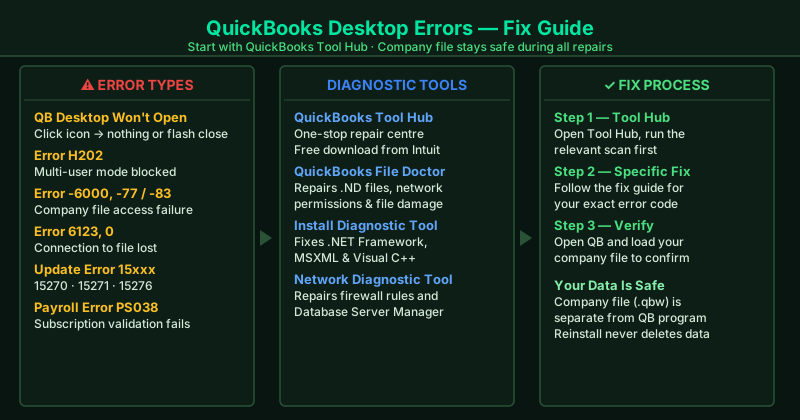
This hub covers the most common QuickBooks Desktop errors. Select the guide that matches your situation.
Fix guides in this pillar
QuickBooks Desktop Won’t Open — Fix
QuickBooks Desktop launches but immediately closes, shows a blank screen, or never appears at all. This guide covers ending stuck background processes, clearing corrupted configuration files, running the QuickBooks Install Diagnostic Tool, and performing a clean reinstall as a last resort.
Best for: QuickBooks icon does nothing when clicked, QuickBooks starts loading then disappears, “QuickBooks has stopped working” message on launch.
QuickBooks Error H202 — Fix
Error H202 appears when switching QuickBooks to multi-user mode and means the workstation cannot connect to the company file on the host computer. This guide covers running the Network Diagnostic Tool, configuring Windows Firewall ports for QuickBooks, and restarting the QuickBooks Database Server Manager.
Best for: H202 error when opening company file in multi-user mode, QuickBooks works on the host computer but not on other workstations, H101, H303, or H505 errors on networked computers.
QuickBooks Error 6000 77 — Fix
Error -6000, -77 appears when QuickBooks cannot access the company file — typically because the file is stored on a network drive with incorrect permissions, or the .ND file that maps the network path is corrupted. This guide covers using QuickBooks File Doctor, moving the company file locally, and resetting network permissions.
Best for: “We’re sorry, QuickBooks encountered a problem” with error -6000, -77 or -6000, -83 when opening a company file.
QuickBooks Error 6123 0 — Fix
Error 6123, 0 means the connection to the QuickBooks company file was unexpectedly broken. It most often appears after a Windows update, when switching hosting settings, or when multiple computers are set to host the company file simultaneously. This guide covers disabling hosting on workstations, running File Doctor, and restoring from a backup.
Best for: “Connection to QuickBooks company file has been lost” with error 6123, 0 — especially after a Windows update or when multiple users are trying to open the file.
QuickBooks Company File Won’t Open — Fix
QuickBooks opens but cannot load the company file — showing a blank screen, a file-damaged warning, or an error about the file location. This guide covers running QuickBooks File Doctor, deleting the .ND and .TLG support files, using Auto Data Recovery, and restoring from a backup.
Best for: “QuickBooks is unable to open this company file,” a blank screen after selecting the company file, or a message that the file may be damaged or located on a disconnected drive.
QuickBooks Update Error 15xxx — Fix
The 15xxx error series appears when a QuickBooks program update or payroll update fails to download or install. Common codes include 15270, 15271, and 15276. This guide covers running the reboot.bat file, resetting QuickBooks update settings, and manually downloading the update.
Best for: “Error 15270: QuickBooks could not find the file,” error 15271 or 15276 during a QuickBooks or payroll update, update progress bar that stops and shows an error.
QuickBooks Payroll Error PS038 — Fix
Payroll error PS038 appears when QuickBooks cannot complete a payroll update — usually because the payroll subscription file (paysub.ini) is corrupted or the subscription status cannot be verified. This guide covers deleting the paysub.ini file, re-verifying your payroll subscription, and running the payroll update manually.
Best for: “Error PS038: QuickBooks is unable to verify your payroll subscription” when running a payroll update, payroll update that starts but never finishes.
QuickBooks Tool Hub — Download and Use
QuickBooks Tool Hub is Intuit’s free all-in-one repair utility for QuickBooks Desktop. It contains File Doctor, the Network Diagnostic Tool, the Install Diagnostic Tool, and the Password Reset Tool under one interface. This guide explains how to download it and which section to use for each error type.
Best for: Any QuickBooks Desktop error — Tool Hub is the recommended first step before attempting more specific repairs. Use Company File Issues for 6000/6123/6190 errors, Network Issues for H202, and Program Problems when QuickBooks won’t open.
QuickBooks Error 3371 — License Fix
Error 3371 Status Code 11118 means QuickBooks cannot validate its license at startup — usually after a Windows reinstall, hardware change, or corrupted license file. This guide covers deleting the EntitlementDataStore.ecml file and re-registering your license, which resolves the error in under five minutes.
Best for: “Could not initialize license properties” error at QuickBooks startup, Error 3371 after a Windows reinstall or moving QuickBooks to a new computer.
QuickBooks Error -6190, -816 — Fix
Error -6190, -816 means the company file is locked in single-user mode on another workstation, or the .TLG transaction log is out of sync. This guide covers clearing the single-user session conflict and deleting the stale .TLG file to restore access for all users.
Best for: “QuickBooks is unable to open this company file” with error -6190, -816 — especially when it appears after someone switched to single-user mode or after an improper QuickBooks shutdown.