
QuickBooks Payroll Error PS038 appears during a payroll update with the message: “QuickBooks is unable to verify your payroll subscription.” The error blocks the payroll tax table download — which means you cannot run accurate payroll until it is resolved. According to Intuit’s PS038 documentation, the most common cause is a corrupted paysub.ini file: a small local file that stores your payroll subscription status. When this file becomes corrupted or out of date, QuickBooks rejects the subscription as unverifiable, even when the subscription itself is perfectly active in your Intuit account.
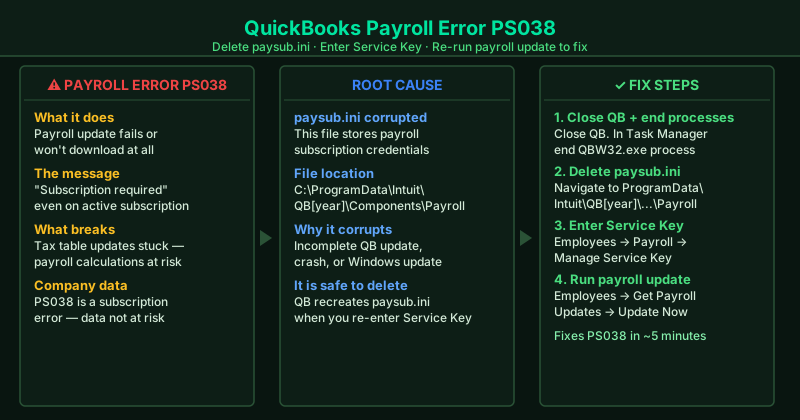
What causes QuickBooks Payroll Error PS038
Corrupted paysub.ini file — The most common cause by far. This file stores a local copy of your payroll subscription status. Corruption can happen from a system crash, an abrupt QuickBooks shutdown during a previous payroll update, or a failed QuickBooks upgrade.
Expired or lapsed payroll subscription — If the payment method for your Intuit payroll subscription failed, your subscription may have been suspended. QuickBooks cannot download payroll updates without an active subscription, and PS038 is how it communicates this.
QuickBooks version upgrade without subscription transfer — After upgrading QuickBooks to a new year version, the paysub.ini file from the old version does not carry over. The new version cannot find its subscription file and shows PS038 on the first payroll update attempt.
Antivirus blocking the subscription verification — Some antivirus programs intercept the HTTPS connection QuickBooks uses to verify subscriptions with Intuit’s servers, causing the verification to fail and triggering PS038.
How to fix QuickBooks Payroll Error PS038
Work through the steps in order. Deleting the paysub.ini file (Step 2) and re-verifying the subscription (Step 3) resolves most PS038 cases.
How to verify the fix
After completing the steps, go to Employees > Get Payroll Updates. If the payroll update downloads and installs without showing PS038, the fix worked. QuickBooks will display the payroll tax table version number after a successful update — note it for your records.
Step-by-step fix
Close QuickBooks completely and end all background processes
Before deleting the paysub.ini file, QuickBooks must be fully closed. Go to File > Close Company/Logoff, then File > Exit. Next, press Ctrl + Shift + Esc to open Task Manager. Look for any processes named QBW32.exe, QBDBMGRN.exe, or qbupdate.exe and end them all. QuickBooks locks the paysub.ini file while it is running — if you try to delete it while QuickBooks is open, you will get an access denied error.
Delete the paysub.ini file
Open File Explorer and navigate to your QuickBooks program folder. For most installations it is: C:\ProgramData\Intuit\QuickBooks [year]\Components\Payroll\. Look for a file named paysub.ini and delete it. If you cannot see the ProgramData folder, it is hidden by default — in File Explorer, click View > Show > Hidden items. The paysub.ini file stores your payroll subscription status locally. When it becomes corrupted, QuickBooks cannot verify the subscription and shows PS038. Deleting it forces QuickBooks to download a fresh copy from Intuit's servers.
Reopen QuickBooks and manually send your payroll subscription
Open QuickBooks and go to Employees > My Payroll Service > Manage Service Key. In the Service Key window, click Edit. Make sure your service key is correct (it should match the one in your Intuit account). Click Next, then Finish. Now go to Employees > My Payroll Service > Account/Billing Information. QuickBooks will connect to Intuit's servers and download fresh subscription information, creating a new paysub.ini file automatically.
Run the payroll update again
After re-establishing the subscription, go to Employees > Get Payroll Updates. In the window that opens, select Download Entire Update and click Update. This downloads the full payroll tax table update from Intuit's servers. Make sure your internet connection is stable during this process — a dropped connection mid-download causes the download to fail and can trigger PS038 again. If the update completes without error, QuickBooks is ready for payroll.
Verify your QuickBooks payroll subscription is active
If deleting paysub.ini and re-sending the subscription does not resolve PS038, the issue may be with the subscription itself. Go to Employees > My Payroll Service > Account/Billing Information. QuickBooks opens a browser window showing your Intuit account. Verify that your payroll subscription shows as Active and that the payment method on file is current. An expired or suspended subscription prevents QuickBooks from downloading payroll updates regardless of any local file fixes.