
QuickBooks Error -6190, -816 appears as: “QuickBooks is unable to open this company file.” Unlike most company file errors, this one is specifically caused by a mode conflict or a stale transaction log — either the company file is currently open in single-user mode on another workstation, or the .TLG transaction log file is out of sync with the company file after an improper shutdown. According to Intuit’s -6190 documentation, the -816 code always indicates a .TLG mismatch, and the fix is to delete the .TLG file and verify that no active single-user session is holding the file.
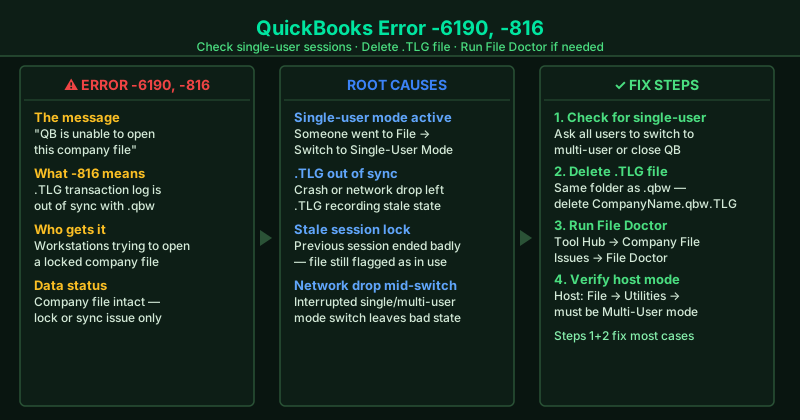
What causes QuickBooks Error -6190, -816
Company file in single-user mode — When any user switches QuickBooks to single-user mode (File > Switch to Single-User Mode), they take exclusive control of the company file. No other workstation can open the same file until that user switches back to multi-user mode or closes QuickBooks entirely.
.TLG file out of sync — The .TLG (Transaction Log) file tracks changes to the company file. If QuickBooks closes improperly — from a crash, a network drop, or a forced termination — the .TLG file becomes out of sync with the company file’s actual state. QuickBooks interprets this mismatch as an active lock and raises Error -6190, -816 even when no real session is running.
Stale lock from a previous session — An improper shutdown leaves the company file flagged as open in single-user mode even after the user’s computer has been closed. The .TLG records this stale lock, and QuickBooks blocks access until the .TLG is deleted and rebuilt.
Network interruption during mode switch — A network drop while switching between single-user and multi-user mode can leave the company file in an intermediate state that triggers -6190 for all users on the network.
How to fix QuickBooks Error -6190, -816
Steps 1 and 2 together resolve the vast majority of -6190, -816 cases.
How to verify the fix
After each step, open QuickBooks and select your company file from the No Company Open screen. If it opens without showing Error -6190 or -816, the fix worked. Once open, go to File > Switch to Multi-User Mode to confirm multi-user access is restored for all workstations, then create a backup: File > Back Up Company > Create Local Backup.
Step-by-step fix
Check if the company file is open in single-user mode on another workstation
Ask everyone in your office whether QuickBooks is currently open on their computer. If someone has the company file in single-user mode (they went to File > Switch to Single-User Mode), no other workstation can open the same file — they all receive Error -6190, -816. Ask that person to go to File > Switch to Multi-User Mode, or to close QuickBooks entirely. Once they switch modes or close QB, try opening the company file on your workstation again. This is the most common cause of -6190, -816.
Delete the .TLG transaction log file
Open File Explorer and navigate to the folder containing your QuickBooks company file (.qbw). In that same folder, look for a file with the same base name as your company file but the extension .TLG — for example, CompanyName.qbw.TLG. Right-click it and delete it. The .TLG file is the transaction log that QuickBooks uses to track unsaved changes. When it is out of sync with the company file — typically after a crash, a network drop, or an improper shutdown — QuickBooks shows Error -6190, -816 even when no one else has the file open. QuickBooks rebuilds the .TLG file automatically when you next open the company file. Your financial data is stored in the .qbw file and is not affected.
Run QuickBooks File Doctor from Tool Hub
Download and open QuickBooks Tool Hub from Intuit's official support page. Go to Company File Issues and click Run QuickBooks File Doctor. Select your company file from the dropdown and choose Check your file. Enter your QuickBooks admin password when prompted. File Doctor checks for .TLG sync issues, network permission problems, and moderate file damage that cause -6190 errors. After the scan (2–5 minutes), try opening the company file in QuickBooks again.
Verify QuickBooks is in multi-user mode on the host computer
On the computer that stores the company file (the host), open QuickBooks and go to File > Utilities. If you see Switch to Multi-User Mode in the menu, click it — the host was in single-user mode, which prevents all other workstations from connecting. If you see Switch to Single-User Mode instead, the host is already in multi-user mode, which is correct. The host must be in multi-user mode at all times for networked workstations to access the company file without Error -6190.
Copy the company file to the local desktop and test
If Error -6190, -816 persists after the above steps, test whether the network path is the underlying issue. Copy your company file (.qbw) to your desktop. Open QuickBooks, go to File > Open or Restore Company, and browse to the copy on your desktop. If QuickBooks opens the file without error in single-user mode, the problem is with the network path or server permissions, not the file itself. Move the company file to a correctly shared local folder on the host computer and reopen from there.