
QuickBooks update errors in the 15xxx range — most commonly 15270, 15271, and 15276 — appear when QuickBooks tries to download and install a program or payroll update but the process fails. The full error message typically reads: “Error 15270: QuickBooks could not find the file” or “Error 15271: A file could not be validated.” According to Intuit’s 15xxx error documentation, the root cause is almost always one of three things: Windows DLL components that need re-registration (fixed by reboot.bat), antivirus software blocking the download, or Internet Explorer security settings that prevent QuickBooks from reaching Intuit’s update servers.
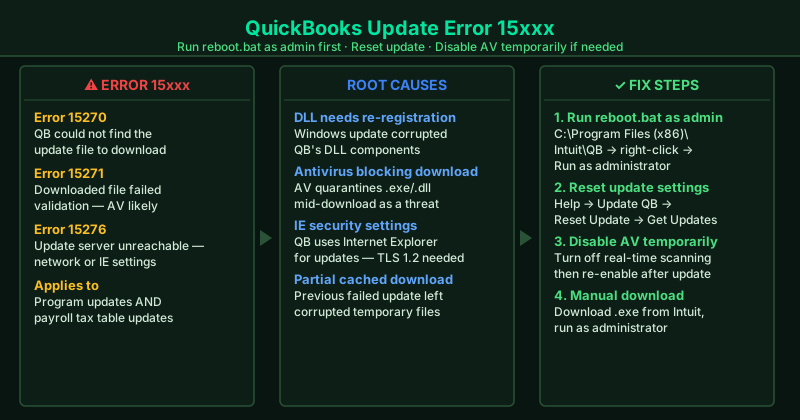
What causes QuickBooks update errors 15270, 15271, 15276
Unregistered or corrupted Windows DLL components — QuickBooks’s update mechanism depends on several Windows DLL (Dynamic Link Library) files. If these get corrupted or unregistered — often after a Windows update — the QuickBooks update process fails to run. Running reboot.bat re-registers them.
Antivirus blocking the update download — Real-time antivirus scanning can quarantine QuickBooks update files mid-download, interpreting the .exe or .dll files as potential threats. The download fails with error 15271, appearing to validate incorrectly.
Internet Explorer security settings — QuickBooks Desktop uses Internet Explorer’s security and TLS settings for its update downloads regardless of which browser you normally use. If IE’s security zones are set too restrictively, or if TLS 1.2 is not enabled, QuickBooks cannot complete the download.
Partially downloaded or cached update files — If a previous update attempt failed partway through, QuickBooks may be trying to continue from a corrupted partial download. Resetting the update clears these cached files.
Firewall blocking Intuit’s update servers — Windows Firewall or a network-level firewall can block the outbound connection to Intuit’s update servers (downloads.quickbooks.com). QuickBooks cannot reach the update and reports error 15276.
How to fix QuickBooks update errors 15xxx
Work through the steps in order. The reboot.bat fix (Step 1) resolves the majority of 15xxx errors.
How to verify the fix
After each step, open QuickBooks and go to Help > Update QuickBooks Desktop > Update Now. Click Get Updates. If the download progress bar completes without showing an error, the fix worked. QuickBooks will prompt you to restart — do so to complete the installation.
Step-by-step fix
Run the reboot.bat file as administrator
Close QuickBooks completely. Open File Explorer and navigate to C:\Program Files (x86)\Intuit\QuickBooks [year]\ (or C:\Program Files\Intuit\QuickBooks [year]\ on 32-bit Windows). Find the file named reboot.bat. Right-click it and select Run as administrator. A Command Prompt window will open, run through a list of registration commands, and close automatically — this takes about 30 seconds. Reboot.bat re-registers the Windows DLL components that QuickBooks update depends on. After it finishes, reopen QuickBooks and try the update again.
Reset QuickBooks update settings
Open QuickBooks and go to Help > Update QuickBooks Desktop. Click the Update Now tab. Check the box next to Reset Update at the top of the list, then click Get Updates. This clears any cached or partially downloaded update files that are causing the 15xxx error. QuickBooks will re-download the full update from Intuit's servers. The download may take several minutes depending on your connection speed. After it completes, restart QuickBooks when prompted.
Disable antivirus real-time protection temporarily during the update
Antivirus programs — including Windows Defender, Norton, McAfee, and Bitdefender — sometimes intercept QuickBooks update downloads and quarantine files, causing 15270 or 15271. Temporarily disable real-time protection in your antivirus program (not the full program — just the real-time scanning feature). Then attempt the QuickBooks or payroll update again. Once the update completes successfully, re-enable real-time protection and add QuickBooks (C:\Program Files (x86)\Intuit\QuickBooks\) to your antivirus exclusion list.
Set Internet Explorer security settings to default for QuickBooks updates
QuickBooks Desktop uses Internet Explorer's security settings for its update downloads, even on computers where you use a different browser. Open Internet Explorer (search for it in the Start menu — it is still installed on Windows 10 and 11). Go to Tools > Internet Options > Security tab. Select the Internet zone and click Default Level. Then click the Advanced tab and scroll down to find Use TLS 1.2 — make sure it is checked. Click Apply and OK. Reopen QuickBooks and try the update again.
Download the QuickBooks update manually from Intuit's website
If the automatic update keeps failing, download the update manually. Go to Intuit's official QuickBooks Desktop download page (search 'QuickBooks Desktop manual update download Intuit'). Find your QuickBooks version and year, and download the full update file (.exe). Save it to your desktop. Close QuickBooks, right-click the downloaded file, and select Run as administrator. The manual installer bypasses the in-product update mechanism entirely and installs the update directly.
Run the QuickBooks Install Diagnostic Tool from Tool Hub
Download and open QuickBooks Tool Hub from Intuit's official support page. Click Installation Issues and select QuickBooks Install Diagnostic Tool. The tool runs for 20–30 minutes and repairs Microsoft .NET Framework, MSXML, and Visual C++ components — all of which the QuickBooks update process depends on. After the repair completes, restart your computer and try the QuickBooks update again.