
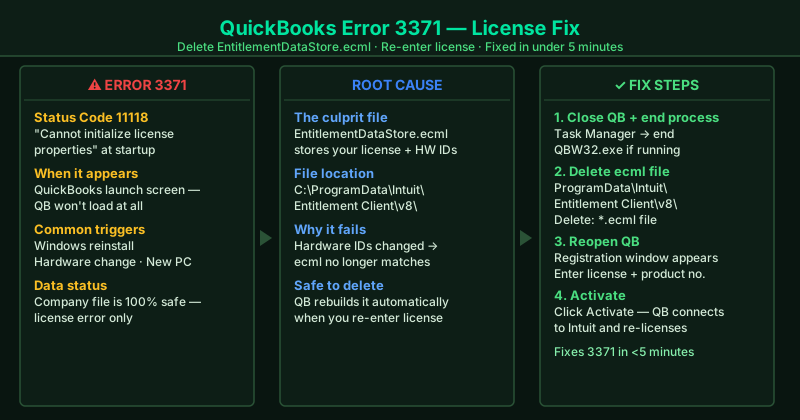
QuickBooks Error 3371 Status Code 11118 appears as: “Could not initialize license properties. QuickBooks is unable to verify the license for this computer.” It occurs at startup — before QuickBooks finishes loading — and stops the program from opening entirely. According to Intuit’s official Error 3371 documentation, the single cause is a corrupted or hardware-mismatched EntitlementDataStore.ecml file, and the fix is always to delete that file and re-register your license. No financial data is at risk.
What causes QuickBooks Error 3371
Corrupted EntitlementDataStore.ecml — The ecml file links your QuickBooks license to your computer’s hardware profile. If it becomes corrupted — from a crash, a failed update, or disk errors — QuickBooks cannot read the license data and refuses to start.
Hardware change after initial registration — QuickBooks records your hardware IDs when you first activate. A Windows reinstall, a motherboard replacement, or a significant hardware change updates those IDs. The old ecml file then fails the hardware check, triggering Error 3371 on every subsequent launch.
Moving QuickBooks to a new computer — Copying QuickBooks program files to a new machine copies the old ecml file with old hardware IDs. The new machine’s IDs don’t match, causing immediate Error 3371.
Windows or QuickBooks update — Major Windows updates can change hardware identifiers stored in the registry, invalidating the existing ecml record. QuickBooks updates occasionally corrupt the entitlement system files directly.
How to fix QuickBooks Error 3371
Step 1 alone resolves the vast majority of Error 3371 cases and takes under five minutes.
How to verify the fix
After completing Steps 1 and 2, QuickBooks should open to the No Company Open screen without any license error. To confirm: go to Help > About QuickBooks — your registered license number should appear correctly. If QuickBooks opens normally, the fix worked.
Step-by-step fix
Delete the EntitlementDataStore.ecml file
Close QuickBooks completely. Open Task Manager (Ctrl+Shift+Esc) and end any QBW32.exe process if it appears. Then open File Explorer and navigate to C:\ProgramData\Intuit\Entitlement Client\v8\. Note: ProgramData is a hidden folder — if you do not see it, go to File Explorer's View menu and check Hidden items, or type the path directly into the address bar. Find the file named EntitlementDataStore.ecml. Right-click it and select Delete. This file stores QuickBooks license information linked to your hardware profile. When it is corrupted or points to old hardware, QuickBooks cannot validate the license and shows Error 3371 on every startup.
Reopen QuickBooks and re-enter your license
Reopen QuickBooks. Because the license file was deleted, QuickBooks displays a registration window asking for your license number and product number. Your license number is a 16-digit number (XXXX-XXXX-XXXX-XXXX) and your product number is a 6-digit code. Find them in your Intuit account at camps.intuit.com under Manage My Licenses, in your original purchase confirmation email, or on the product packaging. Enter both numbers and click Activate. QuickBooks connects to Intuit's servers to validate the license and creates a new EntitlementDataStore.ecml file automatically.
Run reboot.bat if Error 3371 persists after re-registration
If Error 3371 reappears after re-entering your license, the Windows DLL components that QuickBooks license validation depends on may need re-registration. Close QuickBooks and open File Explorer. Navigate to C:\Program Files (x86)\Intuit\QuickBooks [year]\ (or C:\Program Files\Intuit\QuickBooks [year]\ on 32-bit Windows). Right-click the file named reboot.bat and select Run as administrator. The script runs through a list of registration commands in about 30 seconds and closes automatically. Reopen QuickBooks and enter your license again if prompted.
Perform a clean reinstall using the QuickBooks Clean Install Tool
If deleting EntitlementDataStore.ecml and running reboot.bat do not resolve Error 3371, the QuickBooks installation files are corrupted. Download the QuickBooks Clean Install Tool from Intuit's official support page. Before running it, note your license number and product number. Run the Clean Install Tool — it uninstalls QuickBooks and removes leftover program files that a standard uninstall misses. Then reinstall QuickBooks from your Intuit account download or original media and re-enter your license. Your company file is stored separately and is never affected.