
QuickBooks Online not working — whether the error is a broken page, a missing feature, or a generic “Something went wrong” message — is almost always a browser-side or network-side problem, not an account or data issue. According to Intuit’s official troubleshooting documentation, checking the Intuit status page and testing in a private browser window narrows down the cause within 60 seconds.
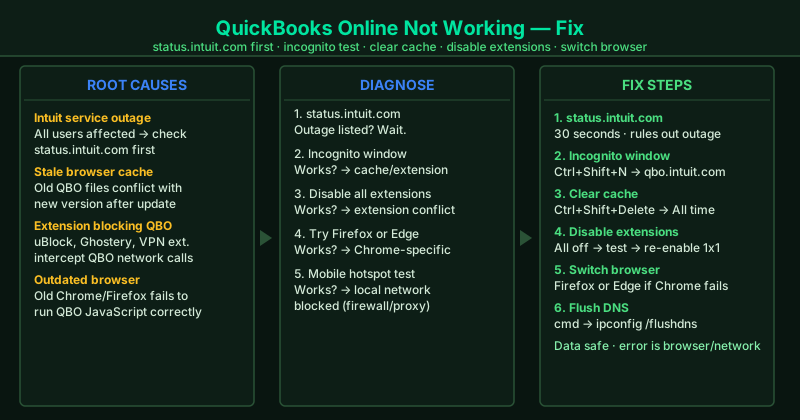
What causes QuickBooks Online to stop working
Intuit service outage — Intuit’s servers occasionally experience incidents that affect all QBO users simultaneously. No local action will fix an active outage — check status.intuit.com before any other step.
Stale browser cache — QuickBooks Online updates its interface regularly. Old cached files from a previous version conflict with the new version and cause features to break or pages to display incorrectly.
Browser extension interference — Ad blockers, script blockers, and VPN extensions intercept network requests that QBO depends on, causing features to fail silently or error out without a clear message.
Outdated browser — QBO uses modern JavaScript and web APIs. Browsers more than one major version behind may fail to execute QBO’s code correctly, causing intermittent or persistent failures.
DNS or local network issue — A stale DNS cache or a corporate firewall that filters HTTPS traffic can prevent QBO from reaching Intuit’s servers for specific operations.
How to fix QuickBooks Online not working
Work through the steps in order. Step 1 takes 30 seconds and rules out an Intuit outage before any local troubleshooting.
How to verify the fix
After each step, open qbo.intuit.com and navigate to the area that was broken — Banking, Payroll, Invoices, or Reports. If that section loads and functions correctly, the fix worked. If QBO is working again but one specific feature remains broken, check status.intuit.com for a feature-specific incident.
Step-by-step fix
Check Intuit's service status page
Go to status.intuit.com in your browser. If Intuit is experiencing an outage or service disruption, an active incident will appear at the top of the page. During outages, QuickBooks Online can display generic errors such as 'Something went wrong,' fail to load specific pages, or behave inconsistently across features. If an active incident is listed, no local troubleshooting will resolve the problem — wait for Intuit to close the incident, then reload QBO.
Test QBO in a private or incognito browser window
Open a private or incognito window — Chrome: Ctrl+Shift+N; Firefox: Ctrl+Shift+P. Go to qbo.intuit.com and sign in. Private windows run with no cached data and no active extensions. If QBO works normally in the private window but not in your regular browser, the problem is a stale browser cache, corrupted cookies, or an extension conflict. Clear your browser cache (Step 3) and test again in a regular window.
Clear your browser cache, cookies, and site data
In Chrome, press Ctrl+Shift+Delete. Set the time range to All time. Check Cookies and other site data and Cached images and files. Click Clear data. Close all browser windows completely, reopen Chrome, and navigate to qbo.intuit.com. QuickBooks Online updates frequently — old cached files from a previous QBO version can cause features to break, pages to display incorrectly, or actions to fail after an update.
Disable browser extensions — especially ad blockers and VPNs
Go to Chrome's three-dot menu > More tools > Extensions and toggle off all extensions. Reload qbo.intuit.com and test the affected feature. Extensions that commonly break QuickBooks Online: uBlock Origin, AdBlock Plus, Privacy Badger, Ghostery, and browser-based VPN or proxy extensions. These tools intercept or block network requests that QBO depends on. If disabling all extensions fixes the problem, re-enable them one at a time to find the specific culprit.
Switch to a supported browser or update your current browser
QuickBooks Online officially supports the latest versions of Chrome, Firefox, and Edge. If QBO is not working in Chrome, test it in Firefox or Edge to determine whether the problem is browser-specific. If you are on an older browser version, update it first: in Chrome, go to Settings > Help > About Google Chrome and click Update Google Chrome if an update is available. Outdated browsers can fail to run QBO's modern JavaScript code correctly.
Flush the DNS cache
Open Command Prompt — press Windows + R, type cmd, press Enter. Type ipconfig /flushdns and press Enter. This clears stale DNS entries that may be routing QBO requests to an outdated or incorrect server IP address. After flushing DNS, close Command Prompt, reopen your browser, and navigate to qbo.intuit.com. A stale DNS entry is a less common cause of QBO failures but resolves cases where other steps have not worked.