
QuickBooks Online errors fall into four main categories: login failures, loading and performance issues, data connection errors (bank feeds and payroll), and browser compatibility problems. According to Intuit’s official QBO support documentation, most errors are resolved by clearing the browser cache, signing in through an incognito window, or waiting for an active Intuit service incident to clear.
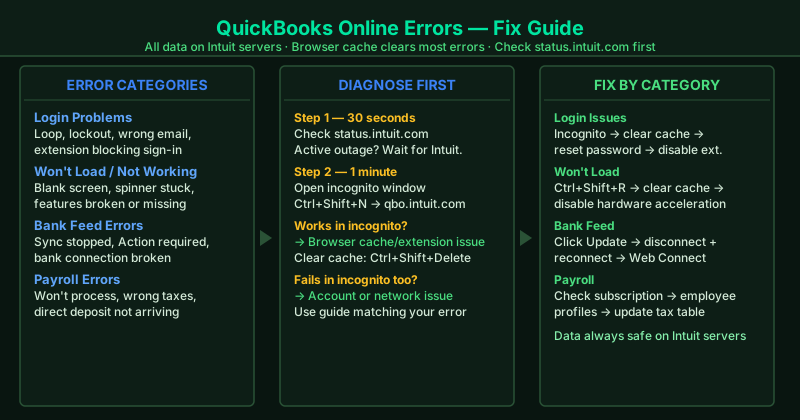
This hub covers the most common QuickBooks Online errors. Select the guide that matches your situation.
Fix guides in this pillar
QuickBooks Online Login Issues — Fix
QuickBooks Online won’t let you sign in, keeps returning you to the login page, or shows “We can’t find that email address.” This guide covers clearing browser session data, resetting your Intuit password, fixing account lockouts, and identifying extension conflicts that block the login flow.
Best for: QBO login loop (keeps redirecting to sign-in page), “incorrect password” when you know the password is correct, account locked after too many attempts, can log in on mobile but not on desktop.
QuickBooks Online Not Working — Fix
QuickBooks Online opens but features stop working, pages error out, or QBO behaves inconsistently across sessions. This guide covers checking Intuit’s service status, clearing browser data, disabling conflicting extensions, and flushing the DNS cache.
Best for: “Something went wrong” error, QBO features missing or broken, QBO not working today when it worked yesterday, QBO slow or behaving unexpectedly.
QuickBooks Online Won’t Load — Fix
QuickBooks Online shows a blank screen, gets stuck at the loading spinner, or never fully opens in Chrome. This guide covers hard reloads, cache clearing, browser hardware acceleration conflicts, and Chrome-specific loading fixes.
Best for: Blank white screen after login, loading spinner that never finishes, QBO not opening after clicking the bookmark, QBO won’t load in Chrome but works in another browser.
QuickBooks Online Bank Feed Not Working — Fix
QuickBooks Online bank feeds stop syncing, show connection errors, or stop importing transactions after a bank security update. This guide covers reconnecting your bank account, handling bank-side security changes, and using Web Connect as a manual import fallback.
Best for: “Action required” or “We’re having trouble connecting” in Banking, bank feed that stopped syncing new transactions, duplicate transactions after a reconnect, bank not listed in QBO’s bank search.
QuickBooks Online Payroll Not Working — Fix
QuickBooks Online Payroll won’t process, payroll taxes calculate incorrectly, or direct deposit isn’t reaching employees on payday. This guide covers subscription verification, tax table updates, employee setup errors, and direct deposit timing rules.
Best for: “We couldn’t process your payroll” error, payroll stuck in processing, employees not receiving direct deposit on payday, incorrect payroll tax calculations.