
Bluetooth mouse not working on Windows 11 means the mouse cursor does not move even though the mouse shows as connected in Bluetooth settings, the cursor freezes intermittently, or the mouse disconnects and requires reconnection every few minutes. According to Microsoft’s official Bluetooth troubleshooting documentation, the most common causes are Windows power management cutting the Bluetooth adapter during idle periods, stale pairing data, or an outdated Bluetooth HID driver.
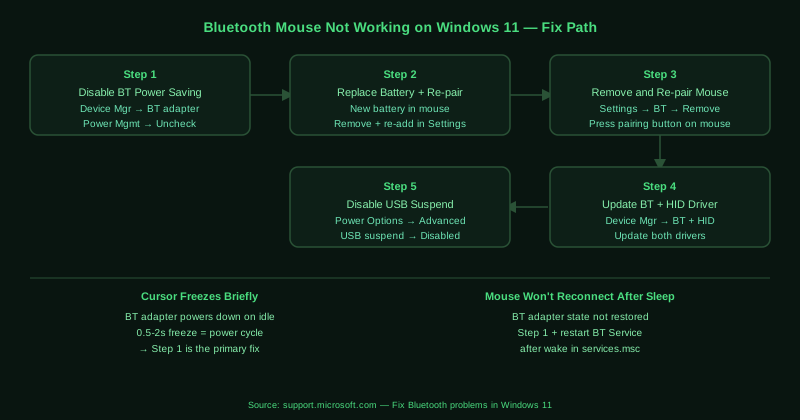
What causes Bluetooth mouse not working on Windows 11
Bluetooth adapter power management — Windows power management can cut power to the Bluetooth adapter during brief idle periods — even a few seconds of mouse inactivity. When this happens, the active HID connection to the mouse is dropped and the cursor freezes until the adapter powers back on, which takes 0.5–2 seconds. This manifests as intermittent cursor freezing rather than a complete disconnection.
Low battery — A Bluetooth mouse with a low battery may report as connected but transmit unreliable signals, causing the cursor to stutter, skip, or stop entirely. The mouse connection state in Windows remains “Connected” even when the battery is too weak to maintain a stable signal.
Stale pairing data — Previous pairing attempts or connections to other computers can leave inconsistent HID pairing data that allows the Bluetooth connection to establish but prevents the HID input from being registered correctly.
How to fix Bluetooth mouse not working on Windows 11
Work through the steps in order. Step 1 (power management) and step 2 (battery replacement) resolve the majority of cases.
How to verify the fix
After applying the power management change, leave the mouse idle for 2–3 minutes, then move it — the cursor should respond immediately without freezing. Test by alternating between periods of activity and 30-second idle pauses. If the cursor responds without delay after each idle period, the fix worked. Also test after putting the computer to sleep and waking it to confirm the mouse reconnects automatically.
Known limitations
Microsoft’s Bluetooth troubleshooter cannot detect hardware faults in the mouse Bluetooth transmitter or Windows’ built-in Bluetooth adapter. A mouse with a failing internal Bluetooth chip may connect intermittently and show as paired while being unresponsive — this appears identical to a software configuration problem. If all driver and pairing fixes fail and the mouse works correctly on another computer, the Bluetooth adapter in the problem PC may have a hardware fault. Some Bluetooth mice also require manufacturer-specific companion software for full functionality on Windows 11 — without this software, customised button assignments, scroll speed, and polling rate adjustments do not apply even when the mouse cursor moves correctly.
Step-by-step fix
Disable Bluetooth adapter power management
Open Device Manager (right-click Start > Device Manager). Expand Bluetooth. Right-click your Bluetooth adapter and select Properties. Go to the Power Management tab and uncheck Allow the computer to turn off this device to save power. Click OK. This setting allows Windows to cut power to the Bluetooth adapter when the mouse is idle for a few seconds, causing the cursor to freeze until the adapter powers back up. Disabling it keeps the adapter active continuously and prevents these micro-disconnections.
Replace the mouse battery and re-pair
A low battery is the most common hardware-side cause of a Bluetooth mouse freezing or disconnecting. Replace the battery with a fresh one even if the battery indicator does not show low — some Bluetooth mice stop reporting accurate battery status before the connection becomes unreliable. After replacing the battery, remove the mouse from Settings > Bluetooth & devices, reset the mouse's pairing (usually hold a button on the bottom of the mouse), and pair it fresh from Add device.
Remove and re-pair the mouse
Open Settings > Bluetooth & devices. Click the three-dot menu next to your Bluetooth mouse and select Remove device. On the mouse, press the pairing or reset button on the bottom of the device (location varies by model — check the manufacturer's documentation). The LED should flash to indicate pairing mode. In Windows, click Add device > Bluetooth and select the mouse when it appears. Re-pairing clears stale connection data that can cause the mouse to appear connected while being unresponsive.
Update the Bluetooth driver and HID driver
Open Device Manager. Under Bluetooth, right-click your Bluetooth adapter and select Update driver > Search automatically for drivers. Also check under Human Interface Devices (HID) for your Bluetooth mouse entry — right-click it and select Update driver. If Windows finds no updates, download the Bluetooth driver from your laptop or motherboard manufacturer's website. An updated Bluetooth driver often includes fixes for HID device reconnection timing that affects how quickly the mouse responds after a brief idle period.
Disable USB selective suspend
If your Bluetooth adapter connects via USB internally or you are using a USB Bluetooth dongle, USB selective suspend can power it down while the mouse is idle. Open Control Panel > Hardware and Sound > Power Options. Click Change plan settings, then Change advanced power settings. Expand USB settings > USB selective suspend setting and change it to Disabled. Click Apply. This keeps the USB Bluetooth adapter powered at all times.