
Adobe Acrobat not opening means you click the application icon or double-click a PDF file and nothing happens — or the application briefly appears, then disappears. According to Adobe’s official troubleshooting documentation, the most common causes are a stuck background process from a previous crash, a corrupted installation, or a Protected Mode conflict on Windows.
What causes Adobe Acrobat not to open
Stuck AcroRd32.exe or Acrobat.exe process — A previous Acrobat session crashed without fully closing. The orphaned process blocks a new launch. Task Manager shows it running, but no window appears.
Corrupted installation files — A failed update, antivirus quarantine, or abrupt shutdown can corrupt Acrobat’s executable or DLL files. The installer reports success but Acrobat cannot start.
Protected Mode conflict — Acrobat’s Protected Mode sandboxes PDF rendering. On some Windows configurations — particularly with certain antivirus programs or corporate group policies — Protected Mode prevents Acrobat from initialising.
Insufficient permissions — Acrobat needs write access to its temporary folders. If those folders have incorrect permissions, the application fails silently on launch.
How to fix Adobe Acrobat not opening
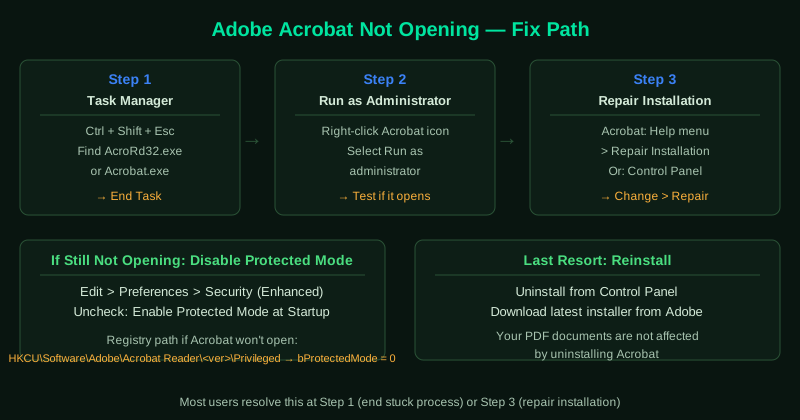
Work through the steps in order. Most users resolve this at step 1 or step 3.
How to verify the fix
After applying each fix, double-click any PDF file on your desktop and wait 10 seconds. If Acrobat opens and displays the document, the fix worked. If Acrobat opens but shows an error about the specific file, the application itself is working — see Cannot Open PDF in Adobe Acrobat — Fix for file-specific problems.
Step-by-step fix
End stuck Acrobat processes in Task Manager
Press Ctrl + Shift + Esc to open Task Manager. Look for any process named AcroRd32.exe, Acrobat.exe, or AcroCEF.exe. Right-click each one and select End Task. These orphaned processes from a previous crash block new launches. After ending all Acrobat processes, try opening Acrobat again.
Run Acrobat as administrator
Right-click the Adobe Acrobat shortcut on your desktop or in the Start menu and select Run as administrator. If Acrobat opens this way, a permissions conflict is preventing normal launch. To make this permanent, right-click the shortcut, select Properties > Compatibility, check Run this program as an administrator, and click OK.
Repair the Acrobat installation
Open Acrobat if it launches at all. Go to Help menu and select Repair Installation. If Acrobat does not open, go to Control Panel > Programs > Programs and Features, find Adobe Acrobat or Acrobat Reader, click Change, and select Repair. The repair process replaces missing or corrupted installation files without removing your documents or settings.
Disable Protected Mode
Protected Mode is a security feature that sandboxes Acrobat and can conflict with certain system configurations. To disable it, open Acrobat (if possible), go to Edit > Preferences > Security (Enhanced) and uncheck Enable Protected Mode at Startup. If you cannot open Acrobat, open Registry Editor (regedit) and navigate to HKEY_CURRENT_USER\Software\Adobe\Acrobat Reader\<version>\Privileged. Set the value of bProtectedMode to 0.
Reinstall Adobe Acrobat
If repair does not fix the problem, uninstall Acrobat from Control Panel > Programs and Features. Download the latest version from Adobe's official website. Run the installer as administrator. Reinstalling replaces all application files and resets settings that may have become corrupted. Your PDF documents are stored in your own folders and are not affected by the reinstall.