
Adobe Acrobat errors range from the application refusing to open to freezing mid-task or failing to display PDF content correctly. According to Adobe’s official troubleshooting documentation, most Acrobat errors fall into three categories: launch failures, crashes during use, and PDF rendering problems.
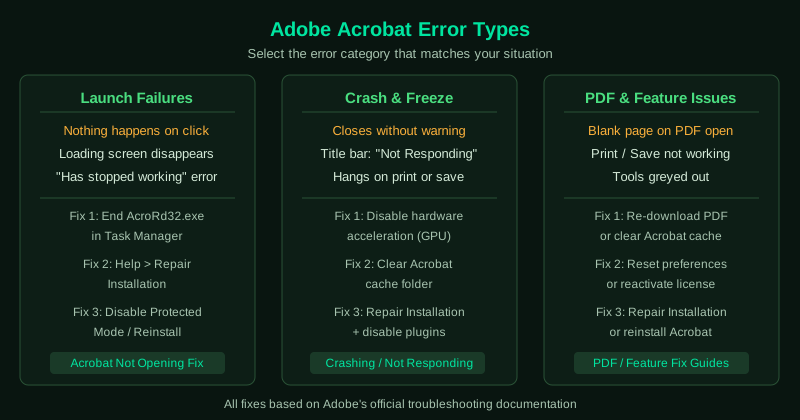
This hub covers the most common Acrobat errors. Select the guide that matches your situation.
Fix guides in this pillar
Adobe Acrobat Not Opening — Fix
Acrobat does not launch at all — you click the icon or a PDF file and nothing happens, or a loading screen briefly appears then disappears. This guide covers ending stuck Acrobat processes, running as administrator, repairing the installation, disabling Protected Mode, and reinstalling.
Best for: Acrobat icon does nothing, application opens briefly then closes, “Adobe Acrobat has stopped working” error.
Cannot Open PDF in Adobe Acrobat — Fix
Acrobat itself opens but a specific PDF file fails to load — you see a blank page, an error message, or the file appears damaged. This guide covers checking the PDF source, repairing the file, clearing Acrobat’s cache, and updating Acrobat.
Best for: Blank page when opening PDF, “file is damaged and cannot be repaired” error, PDF opens in browser but not in Acrobat.
Adobe Acrobat Keeps Crashing — Fix
Acrobat opens but crashes when printing, saving, editing, or shortly after launch. This guide covers disabling hardware acceleration, clearing the cache, repairing the installation, and resolving plugin conflicts.
Best for: Acrobat crashes when printing or saving, crashes after a few minutes of use, crashes on specific file types.
Adobe Acrobat Not Responding — Fix
Acrobat opens but freezes — the title bar shows “Not Responding” and the application stops accepting input. This guide covers ending the frozen process, disabling hardware acceleration, clearing the cache, and adjusting rendering settings.
Best for: Acrobat freezes when opening large PDFs, “Not Responding” in the title bar, Acrobat hangs on startup.
Adobe Acrobat Not Working — Fix
Acrobat opens but features stop functioning — printing fails, saving does not work, editing tools are greyed out, or the application behaves erratically. This guide covers repairing the installation, resetting preferences, and resolving licensing errors.
Best for: Print function does nothing, save fails silently, tools unexpectedly greyed out, activation or licensing errors.
Adobe Reader Not Opening PDF — Fix
Adobe Acrobat Reader is installed but PDF files do not open — double-clicking opens a different application, or Reader launches but shows an error. This guide covers setting Acrobat Reader as the default PDF app, repairing the installation, and resolving file association problems.
Best for: PDFs open in Chrome or Edge instead of Reader, Reader launches but shows an error on the file, “There was an error opening this document” message.