
Word keeps crashing means Microsoft Word closes unexpectedly during use — while typing, saving, printing, or opening certain documents — without displaying a useful error message. According to Microsoft’s Office troubleshooting documentation, Word crashes are most commonly caused by a corrupted Normal.dotm template containing a faulty macro, a COM add-in conflict, or a corrupted printer driver that Word communicates with during startup.
What causes Word to keep crashing
Corrupted Normal.dotm macro — Word loads Normal.dotm on every startup and executes any macros stored in its AutoOpen or Document_Open event. A corrupted or poorly written macro in this template crashes Word immediately after launch or during the first operation.
COM add-in conflict — Grammar checkers, citation managers, and document management tools run inside the Word process. After a Word update, these add-ins may call Word functions that no longer exist in the updated API, causing a crash.
Corrupted font file — Word pre-processes fonts when rendering documents. A corrupted font file in the Windows Fonts folder causes Word to crash when that font is applied or when a document containing that font is opened.
Printer driver communication failure — Word queries the default printer on startup to determine page dimensions. A corrupted printer driver causes this query to fail and crashes Word before the application window even appears.
How to fix Word keeps crashing
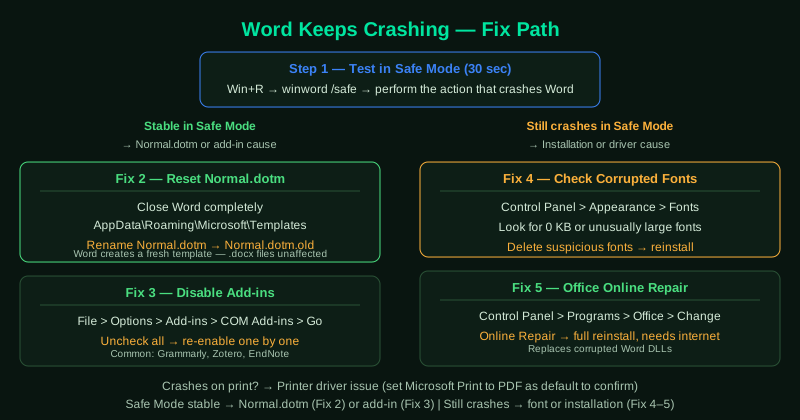
Start with step 1 — the Safe Mode test takes 30 seconds and immediately tells you whether the crash is caused by an add-in or template (fix with steps 2–3) or by the Word installation itself (fix with step 5).
How to verify the fix
Perform the action that previously caused the crash — print a document, save to a network drive, or open the specific file that triggered it. If Word completes the operation without closing, the fix worked. Test across several sessions and different document types to confirm the stability.
Step-by-step fix
Test in Safe Mode to isolate add-ins
Press Windows + R, type winword /safe, and press Enter. Safe Mode disables all COM add-ins, VBA macros in the startup folder, and custom templates. Work in Safe Mode — type, save, and print — and perform the action that previously caused the crash. If Word does not crash in Safe Mode, a COM add-in or a macro stored in the Normal.dotm template is the cause. This single test separates add-in crashes from installation crashes.
Reset the Normal.dotm template
Close Word completely. Open File Explorer and navigate to C:\Users\[YourName]\AppData\Roaming\Microsoft\Templates. Find Normal.dotm and rename it to Normal.dotm.old (do not delete it — you may need to restore it). Restart Word — it creates a fresh Normal.dotm with default settings. If Word stops crashing after this, the old template contained a corrupted macro, style, or AutoText entry. Your .docx documents are not affected.
Disable add-ins one by one
Open Word normally (not Safe Mode). Go to File > Options > Add-ins. In the Manage dropdown, select COM Add-ins and click Go. Uncheck all add-ins and click OK. Restart Word and test if the crash still occurs. If Word is now stable, re-enable add-ins one at a time, restarting after each, until the crash returns. The last add-in you enabled is the cause. Common crash-causing add-ins include Grammarly, citation managers (Zotero, EndNote), and document management tools.
Check for corrupted fonts
Word crashes related to specific documents or when applying certain fonts are often caused by corrupted font files in Windows. Open Control Panel > Appearance and Personalization > Fonts. Look for fonts with unusual file sizes (0 KB or unusually large). Delete any suspicious fonts and reinstall them from a trusted source. Also try opening the problematic document and changing all text to a standard font (like Calibri) to determine if a specific font triggers the crash.
Run Office Online Repair
Go to Control Panel > Programs and Features, find Microsoft 365 or Microsoft Office, click Change, and select Online Repair. Online Repair downloads fresh Word application files from Microsoft's servers and replaces all corrupted components. This is more thorough than Quick Repair and resolves crashes caused by corrupted Word DLL files that Quick Repair cannot fix. After Online Repair, restart your computer.