
Microsoft Office errors cover a wide range of problems across Excel, Word, and PowerPoint — from applications refusing to open, to freezing mid-task, to crashing without warning. According to Microsoft’s official Office troubleshooting documentation, most Office errors fall into three categories: the application not responding or freezing, the application crashing and closing, and files failing to open.
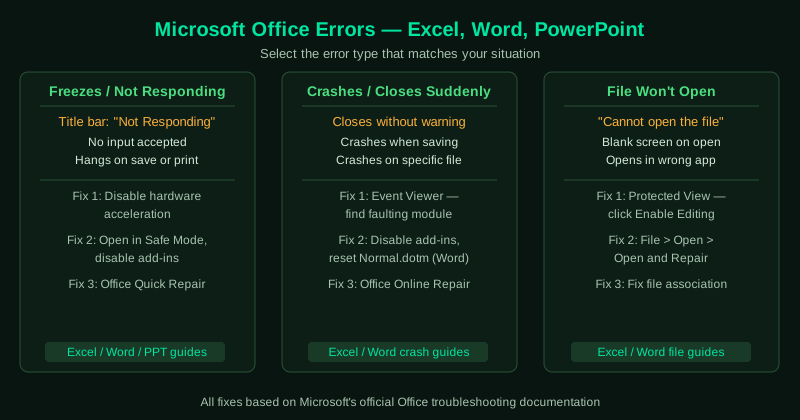
This hub covers the most common Office errors. Select the guide that matches your situation.
Fix guides in this pillar
Excel Not Responding — Fix
Excel freezes and shows “Not Responding” in the title bar — scrolling stops, clicking has no effect, and the application appears locked. This guide covers disabling add-ins, clearing the Office cache, repairing the installation, and adjusting hardware acceleration.
Best for: Excel freezes when opening large files, Excel hangs when saving, “Excel is not responding” in the title bar.
Word Not Responding — Fix
Word freezes and stops accepting input — the title bar shows “Not Responding” and the document cannot be saved or closed normally. This guide covers disabling add-ins, clearing the Word template cache, repairing Office, and recovering unsaved documents.
Best for: Word freezes when printing or saving, “Word is not responding” message, Word hangs on startup.
Excel File Not Opening — Fix
Excel opens but a specific spreadsheet fails to load — you see a blank screen, an error about file format, or Excel shows “cannot open the file.” This guide covers Protected View settings, repairing the file, clearing the Office cache, and updating Excel.
Best for: “Excel cannot open the file” error, blank screen when opening .xlsx, Excel opens then immediately closes on a specific file.
Word Not Opening — Fix
Word documents fail to open — double-clicking a .docx file opens a different application, Word launches but shows an error, or the file appears damaged. This guide covers file association fixes, repairing the Word installation, and recovering corrupted documents.
Best for: .docx files open in the wrong app, “Word cannot open the document” error, Word opens but document shows an error.
PowerPoint Not Responding — Fix
PowerPoint freezes during a presentation, while editing, or when opening a large file with many images or animations. This guide covers disabling hardware acceleration, removing conflicting add-ins, clearing the cache, and repairing Office.
Best for: PowerPoint freezes when playing a slideshow, hangs when inserting images, “Not Responding” during editing.
Excel Keeps Crashing — Fix
Excel opens but crashes unexpectedly — closing without warning when saving, printing, or working with large spreadsheets. This guide covers disabling add-ins, turning off hardware acceleration, repairing the Office installation, and updating Excel.
Best for: Excel crashes when saving, crashes on a specific spreadsheet, crashes after a Windows or Office update.
Word Keeps Crashing — Fix
Word crashes during typing, saving, printing, or when opening certain documents. This guide covers disabling add-ins, clearing the Normal.dotm template, repairing Office, and identifying conflicting fonts or plugins.
Best for: Word crashes when printing, crashes on specific documents, crashes every time you try to save.