
Word not responding means Microsoft Word freezes and stops accepting input — the title bar shows “Not Responding,” you cannot type, save, or close the document normally, and the application must be ended through Task Manager. According to Microsoft’s official Word troubleshooting documentation, the leading causes are a corrupted Normal.dotm template, conflicting add-ins, and hardware acceleration issues on systems with outdated graphics drivers.
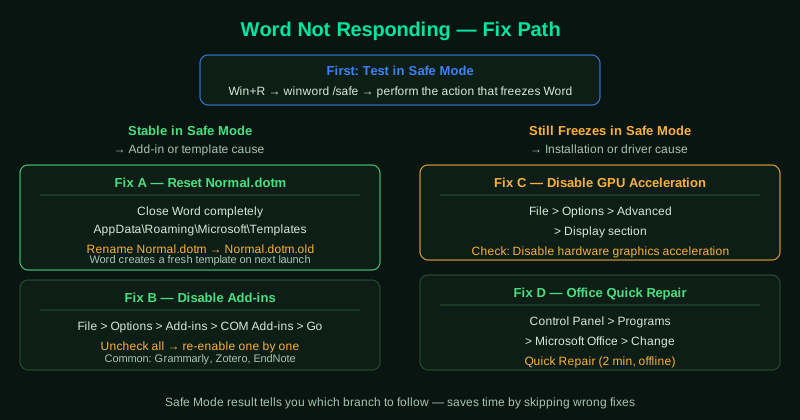
What causes Word to freeze and stop responding
Corrupted Normal.dotm template — Word loads the Normal.dotm template on every startup. A corrupted macro, style, or AutoCorrect entry in this file causes Word to freeze consistently, often within seconds of opening a document.
Add-in conflict — Grammar checkers, citation managers, PDF converters, and document management plugins all integrate deeply into Word. After a Word update, incompatible add-ins can cause freezes during specific operations like saving or printing.
Hardware acceleration rendering bug — Word uses the GPU to render complex documents. Documents with many high-resolution images, complex tables, or heavy use of tracked changes can trigger a GPU rendering stall that locks the Word window.
Printer driver conflict — Word communicates with the printer driver even before you click Print, to set page margins and dimensions. A corrupted or outdated printer driver can cause Word to freeze on startup or when switching documents.
How to fix Word not responding
Work through the steps in order. Safe Mode testing (step 2) quickly identifies add-in conflicts. Resetting Normal.dotm (step 3) resolves the majority of template-related freezes.
How to verify the fix
Open the document that previously caused the freeze. Type several paragraphs, save the file, and attempt a print preview. If Word remains responsive and saves successfully, the fix worked. If a specific document still freezes Word but others open normally, the document itself may be corrupted — try File > Open > Open and Repair to recover its content.
Step-by-step fix
End the frozen Word process in Task Manager
Press Ctrl + Shift + Esc to open Task Manager. Find WINWORD.EXE or Microsoft Word in the list — its status will show Not Responding. Right-click it and select End Task. Wait 10 seconds. If Word was in the middle of a save, Windows will have created an autosaved version. Do not open a new Word window until the process has fully closed.
Open Word in Safe Mode
Hold the Ctrl key and double-click the Word shortcut, or press Windows + R, type winword /safe, and press Enter. Word Safe Mode disables all add-ins, custom templates, and startup items. If Word works normally in Safe Mode, a third-party add-in or a corrupted Normal.dotm template is the cause. Go to File > Options > Add-ins, set the dropdown to COM Add-ins, click Go, and disable each add-in one at a time to identify the problem.
Reset the Normal.dotm template
The Normal.dotm file is Word's default template. If it becomes corrupted, Word freezes consistently regardless of which document you open. Close Word completely. Open File Explorer and navigate to C:\Users\[YourName]\AppData\Roaming\Microsoft\Templates. Find Normal.dotm, right-click it, and rename it to Normal.dotm.bak. Restart Word — it will create a fresh Normal.dotm automatically. Your documents are not affected, but custom styles saved in Normal.dotm will be reset to defaults.
Disable hardware acceleration
Go to File > Options > Advanced. Scroll to the Display section and check Disable hardware graphics acceleration. Click OK and restart Word. On systems with incompatible GPU drivers, hardware acceleration causes Word to freeze when rendering complex documents with many images, tables, or tracked changes.
Run Office Quick Repair
Go to Control Panel > Programs and Features. Find Microsoft 365 or Microsoft Office, click Change, and select Quick Repair. Click Repair. The Quick Repair process takes about 2 minutes and replaces corrupted Word files without requiring an internet connection. If freezes continue, run Online Repair, which downloads a fresh copy of Office from Microsoft's servers and performs a complete reinstallation of Office components.