
Windows 11 upgrade errors cover a range of failures: monthly cumulative updates that refuse to install, version upgrades that roll back after restarting, installation failures halfway through, and PCs that cannot begin the upgrade at all due to missing hardware requirements. According to Microsoft’s official documentation, most failures fall into four categories — driver conflicts, corrupted Windows component store, hardware compatibility blocks, and insufficient disk space.
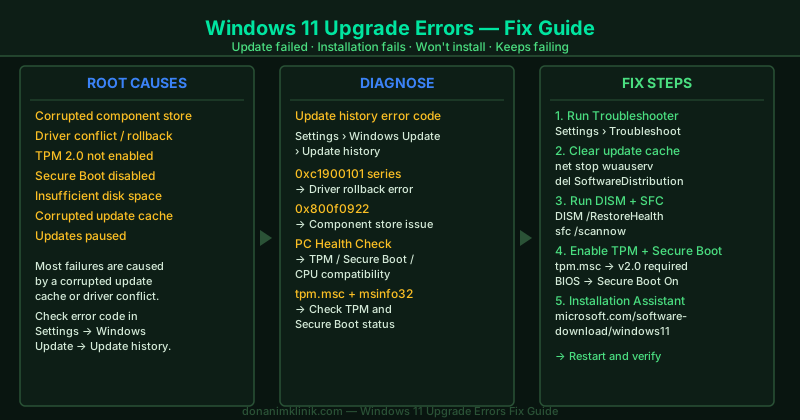
This hub identifies which problem you have and links to the fix guide that resolves it.
Fix guides in this pillar
Windows 11 Update Failed — Fix
A Windows 11 cumulative or security update downloaded but failed to install, showing a generic failure in Update history. This guide walks through the Windows Update Troubleshooter, clearing the SoftwareDistribution cache, running DISM and SFC to repair system files, checking driver compatibility, and downloading the update manually from the Microsoft Update Catalog.
Best for: Update shows “Failed” status in Update history, update downloads but rolls back on restart, no specific error code displayed.
Windows 11 Installation Fails — Fix
The Windows 11 installation begins but fails partway through — either during the download phase, the “Installing” phase, or after the post-restart configuration. This guide covers DISM component store repair, driver conflict resolution, and verifying TPM 2.0 and Secure Boot status.
Best for: “Installation failed” message, upgrade begins then reverts, error code visible in Update history after a failed install attempt.
Windows 11 Won’t Install — Fix
Windows 11 is not offered as an available update, or the PC refuses to begin the installation entirely. This is usually a hardware compatibility block. This guide covers running PC Health Check to identify the exact missing requirement, enabling TPM 2.0 and Secure Boot in BIOS/UEFI, and using the Windows 11 Installation Assistant to bypass Windows Update delivery delays.
Best for: Windows 11 not showing as available on an eligible PC, “This PC doesn’t meet Windows 11 requirements” message, Installation Assistant won’t proceed.
Windows 11 Update Keeps Failing — Fix
Every Windows Update attempt ends in failure and rollback — the same update fails repeatedly, sometimes multiple times across weeks. This guide resets all Windows Update components by renaming the SoftwareDistribution and catroot2 folders, stopping and restarting the four core update services, and running DISM to repair the underlying Windows image.
Best for: The same cumulative update has failed two or more times, updates download and then roll back every time, update history shows repeated failures for the same KB number.
Windows 11 Unable to Update — Fix
Windows Update opens but cannot check for updates, shows no available updates when updates are known to exist, or displays a persistent error preventing the check from completing. This guide covers resuming paused updates, restarting the Windows Update service, correcting metered connection settings, and clearing the SoftwareDistribution cache.
Best for: “Updates paused” banner, Windows Update page shows an error on load, PC not receiving updates that other PCs on the same network are getting.
Windows 11 Upgrade Fails — Fix
A Windows 11 version upgrade (22H2, 23H2, 24H2) fails during download, installation, or after the first restart. Version upgrades have stricter disk space requirements and modify more Windows components than monthly updates. This guide covers freeing disk space, using the Installation Assistant as a more reliable upgrade path, and running DISM to repair the Windows image before retrying.
Best for: Version upgrade fails (not monthly cumulative updates), “Upgrade failed” after a long installation, Installation Assistant reports an error.
Windows Update Error 0xc1900101 — Fix
Error 0xc1900101 and its variants (-0x20017, -0x30018, -0x40017) are driver rollback errors specific to feature updates and Windows 11 upgrades. The upgrade fails because a driver crashes or becomes incompatible during the installation process. This guide identifies the failing driver and walks through the targeted uninstall and reinstall steps.
Best for: Error code 0xc1900101 in Update history, upgrade rolls back with a driver-related error message.
How Windows 11 updates and upgrades work
Windows 11 delivers two types of changes through Windows Update. Cumulative updates — security patches, bug fixes, and small improvements — arrive monthly and require 3–5 GB of disk space. Version upgrades (feature updates) replace core Windows components and require 20 GB or more of free disk space and a longer installation window, often involving two or three restarts.
Both types use the Windows Update service (wuauserv) and download files to C:\Windows\SoftwareDistribution\Download. The installation modifies the Windows Component Store (C:\Windows\WinSxS), which is why DISM — the Deployment Image Servicing and Management tool — is the correct repair tool when installation failures occur. SFC (sfc /scannow) repairs individual system files after DISM repairs the component store.
Version upgrades additionally verify hardware compatibility (TPM 2.0, Secure Boot, CPU support) before beginning. If any requirement is not met, the upgrade will not start. Driver compatibility is checked during installation — a driver that cannot initialize in the new Windows version causes a rollback with error 0xc1900101.
When to contact Microsoft Support
If you have worked through the relevant guides in this pillar and the upgrade still fails, contact Microsoft Support at support.microsoft.com. Before contacting support, collect the exact error code from Settings → Windows Update → Update history — this is the single most useful piece of information for diagnosing the failure quickly.