
System Restore is Windows’ built-in rollback tool for your operating system. When a driver, update, or software installation causes crashes, slowdowns, or error messages, System Restore reverts your system files, registry, and programs to a point where everything worked — without touching your documents, photos, or other personal files.
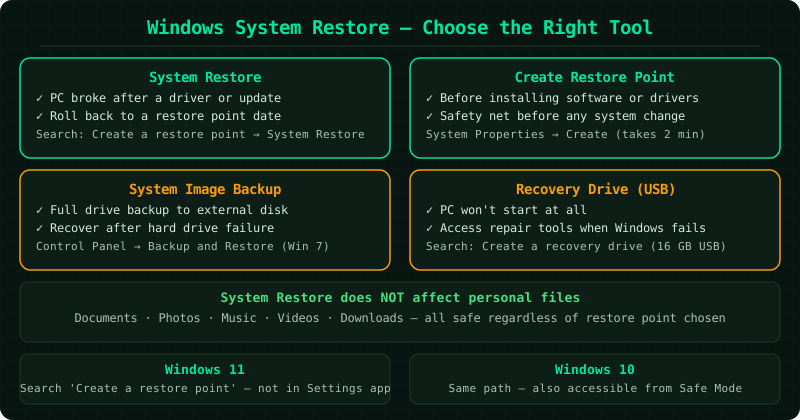
System Restore works through restore points — snapshots of your system configuration that Windows creates automatically before major changes, and that you can also create manually before making your own changes. If something breaks later, you select a restore point from before the problem and Windows reverts to that configuration.
What System Restore does and does not do
Restores: System files, the Windows registry, installed programs, and driver files.
Does not restore: Personal files — documents, photos, downloads, and emails are completely untouched regardless of which restore point you choose.
Does not recover: Files deleted from the file system. For deleted file recovery, see the File Recovery Windows guides.
Fix guides in this pillar
Restore From a Restore Point
Step-by-step walkthrough of using System Restore to undo changes — opening the restore wizard, selecting the right restore point, confirming the operation, and verifying that the problem is resolved.
Best for: PC broke after a driver install, Windows Update, or software change — you want to roll back to a working state.
Windows 11 System Restore
Using System Restore specifically on Windows 11 — where to find System Protection settings, how the interface differs from Windows 10, and how to enable System Restore if it was turned off.
Best for: Windows 11 users whose PC stopped working correctly after an update or installation.
System Restore Windows 10
Complete guide to System Restore on Windows 10 — enabling System Protection, creating and using restore points, and running System Restore from Safe Mode when the desktop is inaccessible.
Best for: Windows 10 users troubleshooting system changes that caused problems.
Create a Restore Point — Windows
How to manually create a restore point before installing software, updating drivers, or making registry changes — takes 30 seconds and provides an instant rollback option if something goes wrong.
Best for: Anyone about to make system changes who wants a safety net in place first.
Restore Computer to Earlier Date
How to take your computer back to how it was on a specific earlier date using System Restore — finding the right restore point, understanding what changes will be undone, and confirming the restore is working.
Best for: Something changed recently and you want to go back to a specific date when the PC was working.
Windows Backup and Restore
Creating a full Windows system image backup to an external drive and restoring from it — protects against hard drive failure, Windows corruption, and scenarios where restore points alone are not enough.
Best for: Creating a complete backup of Windows before major changes, or recovering from a drive failure.
Windows Recovery Drive
How to create a Windows recovery USB drive that can boot your PC and access repair tools when Windows itself will not start — essential when the system is too broken to open System Restore normally.
Best for: PC will not start at all, or Windows will not load — need a bootable recovery tool.